
Alive Bot Modules
| Line 5: | Line 5: | ||
== Using Alive Modules == |
== Using Alive Modules == |
||
| - | To use Alive |
+ | To use Alive Modules, you need to purchase a module and attach to your bot: |
| - | # Open SmartBots Bot Store and locate the module you need:[[Image:Alive module store.jpg|link= |
+ | # Open SmartBots Bot Store and locate the module you need:[[Image:Alive module store.jpg|link=|center]] |
| - | # Purchase |
+ | # Purchase the module using [[Wallet]] or in-world terminal:[[Image:Pay for alive module.jpg|link=1|center]]
|
| - | # Attach Alive Module to your bot:[[Image:Attach alive module.jpg|link= |
+ | # Attach Alive Module to your bot:[[Image:Attach alive module.jpg|link=|center]] |
The module purchases are one-time, you can use your purchased module without restrictions. 3 days refund is available if you did not like the module. |
The module purchases are one-time, you can use your purchased module without restrictions. 3 days refund is available if you did not like the module. |
||
Revision as of 16:14, 11 December 2012
Alive Bot Modules are add-ons for your SmartBots bot. They add various features to your bot and make it really alive and interactive. See the Alive modules list below for details.
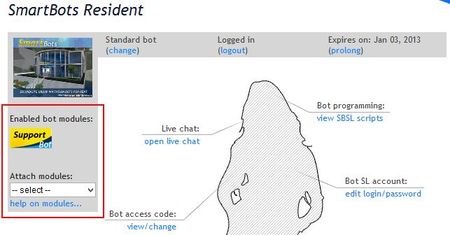
Using Alive Modules
To use Alive Modules, you need to purchase a module and attach to your bot:
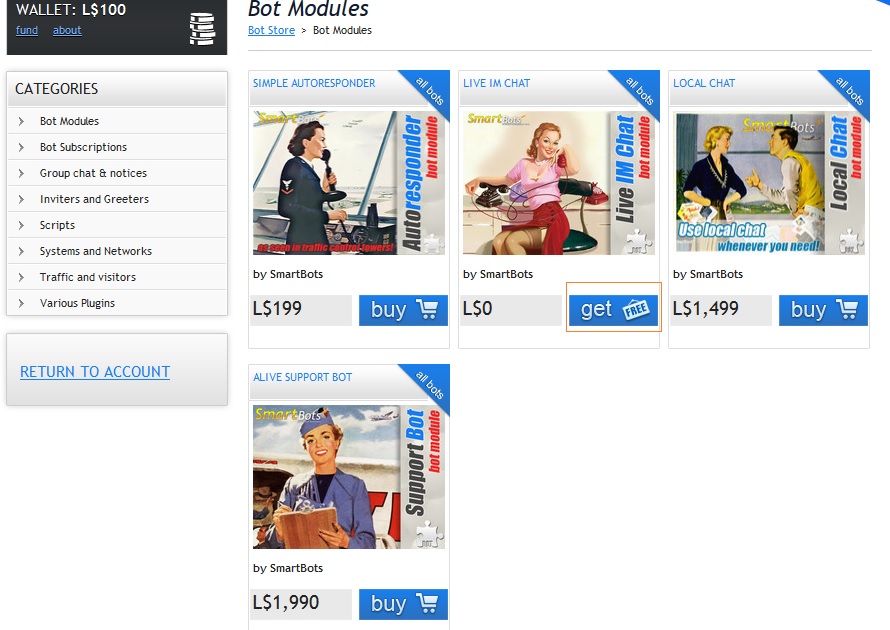
- Open SmartBots Bot Store and locate the module you need:
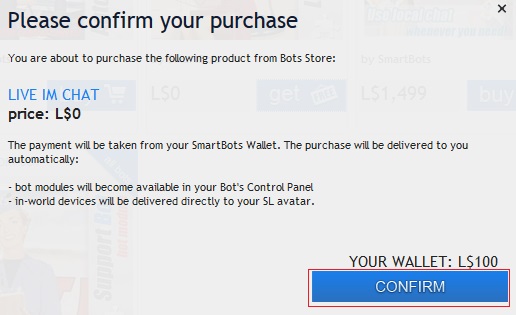
- Purchase the module using Wallet or in-world terminal:
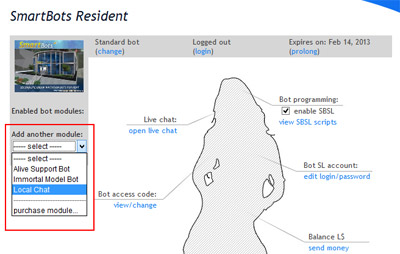
- Attach Alive Module to your bot:
The module purchases are one-time, you can use your purchased module without restrictions. 3 days refund is available if you did not like the module.
Existing Modules
The following Alive Modules are currently available at SmartBots:
| Module | Description |
|---|---|
| Support Bot | Your bot turns into 24/7 support machine:
|