
Immortal Bot (Alive Module)
| Line 4: | Line 4: | ||
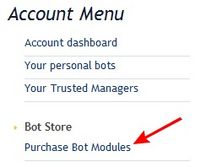
# Open SmartBots Bot Store:[[Image:Purchase immortal 1.jpg|link=|center|border]] |
# Open SmartBots Bot Store:[[Image:Purchase immortal 1.jpg|link=|center|border]] |
||
| - | # Purchase the module in Bot Store (view instructions [[Purchasing Alive Module|here]]) |
+ | # Purchase the module in Bot Store (view instructions [[Purchasing Alive Module|here]]).
|
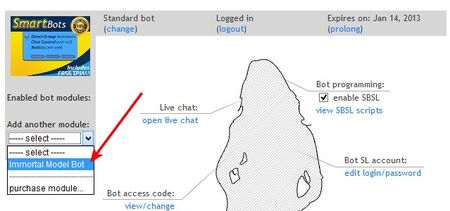
| + | # Attach it to your Model Bot (use [[Personal Bot Control Panel]]): [[Image:Purchase immortal 3.jpg|link=|center|border]] |
||
# Enjoy your model bot never expire! |
# Enjoy your model bot never expire! |
||
Revision as of 17:06, 19 December 2012
"Immortal Bot" module makes your model bot never-expiring.
How does it work
- Open SmartBots Bot Store:
- Purchase the module in Bot Store (view instructions here).
- Attach it to your Model Bot (use Personal Bot Control Panel):
- Enjoy your model bot never expire!
Additional information
- This module can be used only with Model Personal Bots
- You can detach module from one bot and attach it to another. The "Immortal" status will be moved to another bot.
- You can refund your module purchase within 3 days.