
Purchasing Alive Module
| Line 9: | Line 9: | ||
The following images demonstrate the process of Alive Module installation: |
The following images demonstrate the process of Alive Module installation: |
||
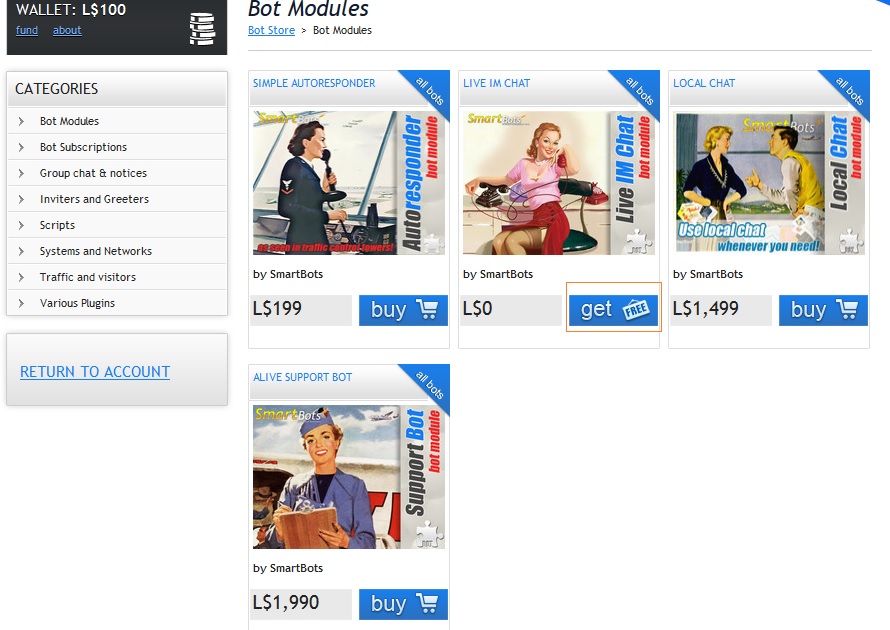
| - | # Open SmartBots Bot Store and locate the module you need:[[Image:Alive module store.jpg|link=|right|border]] |
+ | # Open SmartBots Bot Store and locate the module you need:[[Image:Alive module store.jpg|link=|right|border]]<div class="clearBoth"></div>
|
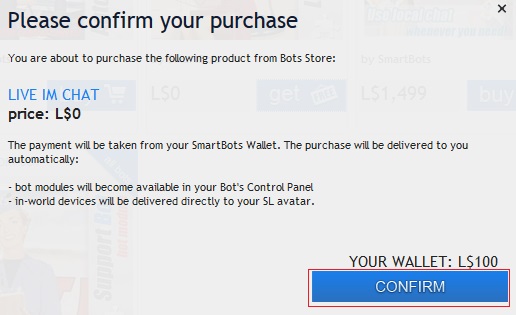
# Purchase the module using [[Wallet]] or in-world terminal:[[Image:Pay for alive module.jpg|link=1|right|border]] |
# Purchase the module using [[Wallet]] or in-world terminal:[[Image:Pay for alive module.jpg|link=1|right|border]] |
||
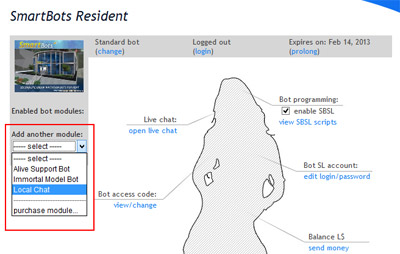
# Attach Alive Module to your bot:[[Image:Attach alive module.jpg|link=|right|border]] |
# Attach Alive Module to your bot:[[Image:Attach alive module.jpg|link=|right|border]] |
||
Revision as of 15:44, 6 February 2013
The overall process of the Alive Module purchase is the following:
- Enter Bot Store
- Purchase the module
- Attach module to your bot
Detailed instructions
The following images demonstrate the process of Alive Module installation:
- Open SmartBots Bot Store and locate the module you need:
- Purchase the module using Wallet or in-world terminal:
- Attach Alive Module to your bot:
For general information on Alive Modules click here.