
Bot base location
| Line 1: | Line 1: | ||
Your bot has its own '''base location''' and able to return to this location even after a lengthy sim restart. Base location is where you prefer your bot to stay (e.g. your office). |
Your bot has its own '''base location''' and able to return to this location even after a lengthy sim restart. Base location is where you prefer your bot to stay (e.g. your office). |
||
| - | == Controlling bot location == |
+ | == Controlling your bot location == |
By default, your bot logs in to the base location, and reliable returns there even if it is pushed off the sim (for example, after a sim restart). |
By default, your bot logs in to the base location, and reliable returns there even if it is pushed off the sim (for example, after a sim restart). |
||
| - | There are several options which control your bot: |
+ | There are several options at [[Personal Bot Control Panel|Bot Control Panel]] which control your bot: |
| - | [[Image:Bot |
+ | [[Image:Bot-base-location.png|center|link=|border]] |
* "Base location" determines the place bot goes to. |
* "Base location" determines the place bot goes to. |
||
| Line 13: | Line 13: | ||
If you want your bot to wander all over SL, uncheck "Always return to base" option. |
If you want your bot to wander all over SL, uncheck "Always return to base" option. |
||
| + | |||
| + | "Multi-sim support" option allows your bot travel by crossing sim-borders. |
||
== What happens when... == |
== What happens when... == |
||
Revision as of 17:49, 12 January 2017
Your bot has its own base location and able to return to this location even after a lengthy sim restart. Base location is where you prefer your bot to stay (e.g. your office).
Controlling your bot location
By default, your bot logs in to the base location, and reliable returns there even if it is pushed off the sim (for example, after a sim restart).
There are several options at Bot Control Panel which control your bot:
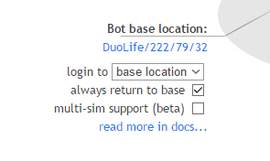
- "Base location" determines the place bot goes to.
- "Login to" allows to select where your bot logs in
- "Always return to base" tells your bot to repeatedly return to base if he leaves the sim.
If you want your bot to wander all over SL, uncheck "Always return to base" option.
"Multi-sim support" option allows your bot travel by crossing sim-borders.
What happens when...
...bot logs in
When your bot logs in, it:
- If "login to last location" is turned on, bot logs into the last location.
- Otherwise it logs in directly to "base location".
...region restart
The following happen on region restart:
- SL kicks your bot from sim and logs it off.
- Bot tries to log back in, but SL sends it to the Linden's hubs.
- Bot knows its "base location" and keeps trying to teleport back every few minutes, until the region is back.
Thus, listing the "base location" is very important: it helps your bot to leave Linden's hub on region restart.