Purchasing Alive Module
| Line 11: | Line 11: | ||
{| |
{| |
||
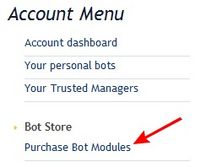
# Open SmartBots Bot Store:[[Image:Purchase immortal 1.jpg|link=|center|border]] |
# Open SmartBots Bot Store:[[Image:Purchase immortal 1.jpg|link=|center|border]] |
||
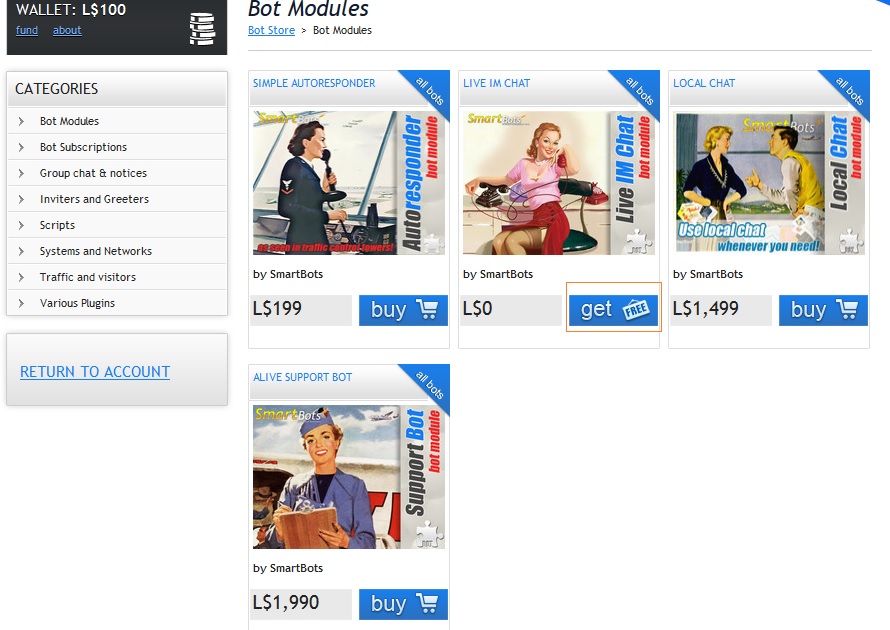
| - | # Locate the module you need and click buy:[[Image:Alive module store.jpg|link=|center|border]] |
+ | # Locate the module you need and click buy/get:[[Image:Alive module store.jpg|link=|center|border]] |
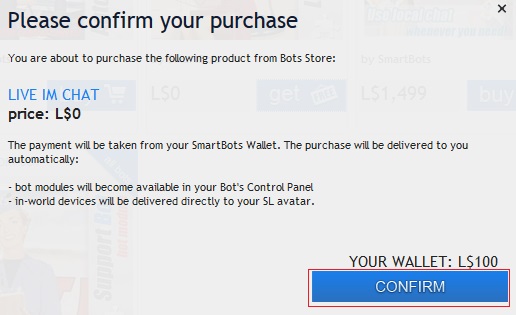
# Pay for the module using [[Wallet]] or in-world terminal(see [[How to pay for Additional Services]] for more details):[[Image:Pay for alive module.jpg|link=|center|border]] |
# Pay for the module using [[Wallet]] or in-world terminal(see [[How to pay for Additional Services]] for more details):[[Image:Pay for alive module.jpg|link=|center|border]] |
||
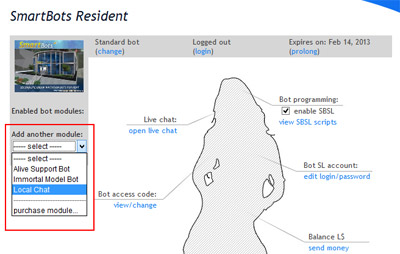
# After purchasing, open your bot control panel. Open modules list and attach Alive Module to your bot:[[Image:Attach alive module.jpg|link=|center|border]] |
# After purchasing, open your bot control panel. Open modules list and attach Alive Module to your bot:[[Image:Attach alive module.jpg|link=|center|border]] |
||
Revision as of 07:13, 1 May 2013
The overall process of purchasing an Alive Module is as follows:
- Enter Bot Store
- Purchase the module
- Attach module to your bot
Detailed instructions
The following images demonstrate the process of Alive Module installation: