
Register Bot How-to
How to Register a Personal Bot
SmartBots allows you to host and manage your own Second Life avatar as a Personal Bot, keeping it online without needing to run a Second Life viewer on your computer.
Before registering your Personal Bot, you will need a SmartBots account and a separate Second Life avatar that will be used as your bot.
Important: Do not use your main Second Life avatar as your Personal Bot. Doing so may cause account conflicts, interfere with normal functionality, and create issues when accessing Second Life. We strongly recommend creating a separate Second Life account specifically for your bot.
Getting Started
If you are new to SmartBots, start by creating a SmartBots account.
Once your account is ready, you can register your Personal Bot through the SmartBots Dashboard.
You can also watch our Personal Bot Registration Video Guide for a visual walkthrough.
Registering Your Personal Bot
Follow these steps to create and register your Personal Bot:
Step 1: Create a Second Life Avatar
Before registering your bot with SmartBots, you must create a separate Second Life avatar.
Follow our Registering Second Life bot guide for detailed instructions.
Step 2: Configure Your Bot's Appearance
Log in to Second Life using your newly created bot avatar.
During your initial login:
Complete the initial avatar setup.
Select your preferred avatar appearance.
Customize your bot's appearance as desired.
Once your avatar is ready, you can proceed with SmartBots registration.
Step 3: Open the Personal Bot Registration Form
Log in to your Account Dashboard.
Select Personal Bots from the left-hand navigation menu.
Click Add Bot in the top-right corner.
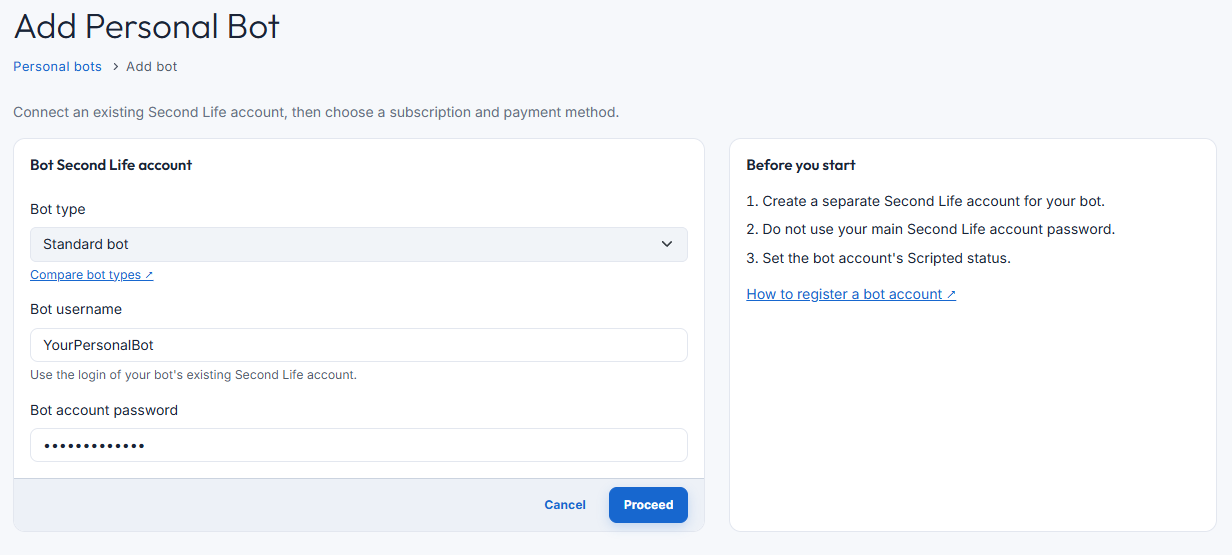
Step 4: Enter Your Bot's Details
Complete the registration form using your bot's Second Life account information.
You will need to provide:
Bot Name: Enter the Second Life username of the avatar you created for your bot.
Bot Password: Enter the password associated with your bot's Second Life account.
Bot Type: Select the type of Personal Bot that best suits your needs.
For more information about the available options, see our Type of Personal Bots guide.
What Happens After Registration?
Once your Personal Bot has been successfully registered and paid, SmartBots will automatically begin launching it.
Your bot should normally connect to Second Life within a few minutes.
After your bot is online, you can access its settings through the Personal Bot Control Panel or control it directly in Second Life using the Personal Bot HUD.