
Wallet
|
QuincyJohnes (Talk | contribs)
(→Usage)
|
|||
| (7 intermediate revisions not shown) | |||
| Line 1: | Line 1: | ||
| - | SmartBots Wallet is the money reserve which will be automatically used to prolong your subscriptions. |
+ | SmartBots Wallet is the money reserve which will be automatically used to '''prolong''' your subscriptions. |
== Usage == |
== Usage == |
||
| - | [[Image:Wallet balance example. |
+ | [[Image:Wallet balance example.png|right|link=]] |
For example, if you have L$500 deposited in your Wallet, and one of your groups is going to expire, L$79 will be automatically taken from your Wallet. |
For example, if you have L$500 deposited in your Wallet, and one of your groups is going to expire, L$79 will be automatically taken from your Wallet. |
||
Likewise, if your personal bot subscription is going to expire, L$479 will be taken from the Wallet to prolong the bot. |
Likewise, if your personal bot subscription is going to expire, L$479 will be taken from the Wallet to prolong the bot. |
||
| + | |||
| + | Your wallet '''cannot''' be used to re-start groups that have already expired. This is so that if you intentionally expire a group, no money will be taken from your wallet to re-start it. |
||
<div class="clearBoth"></div> |
<div class="clearBoth"></div> |
||
| + | |||
== Funding your Wallet == |
== Funding your Wallet == |
||
| - | [[Image:Fund wallet menu. |
+ | [[Image:Fund wallet menu.png|right|link=]] |
You can fund your wallet by using SmartBots Terminal, PayPal or credit card. |
You can fund your wallet by using SmartBots Terminal, PayPal or credit card. |
||
| - | Login to your SmartBots account and click the "fund" link to |
+ | Login to your SmartBots account and click the "fund" link to add funds to your balance. |
<div class="clearBoth"></div> |
<div class="clearBoth"></div> |
||
| + | |||
| + | == Wallet Settings == |
||
| + | |||
| + | You are able to turn off/on your automatic subscription payments for your [[Personal Bot]] or [[Group Services]] by navigating to your account dashboard and clicking on "Settings" nearby to your wallet balance. |
||
[[Category: Existing customers]] |
[[Category: Existing customers]] |
||
Latest revision as of 12:31, 26 July 2016
SmartBots Wallet is the money reserve which will be automatically used to prolong your subscriptions.
Usage
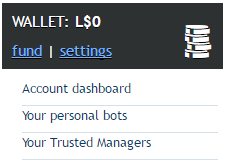
For example, if you have L$500 deposited in your Wallet, and one of your groups is going to expire, L$79 will be automatically taken from your Wallet.
Likewise, if your personal bot subscription is going to expire, L$479 will be taken from the Wallet to prolong the bot.
Your wallet cannot be used to re-start groups that have already expired. This is so that if you intentionally expire a group, no money will be taken from your wallet to re-start it.
Funding your Wallet
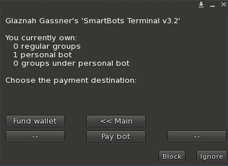
You can fund your wallet by using SmartBots Terminal, PayPal or credit card.
Login to your SmartBots account and click the "fund" link to add funds to your balance.
Wallet Settings
You are able to turn off/on your automatic subscription payments for your Personal Bot or Group Services by navigating to your account dashboard and clicking on "Settings" nearby to your wallet balance.