
Setting up barkeeper messages
| Line 40: | Line 40: | ||
Below is a table of the available messages and a description what they do: |
Below is a table of the available messages and a description what they do: |
||
| - | {{Generic 2-table start| |
+ | {{Generic 2-table start|Message|Description}} |
|- class="row-b" |
|- class="row-b" |
||
| '''hello''' |
| '''hello''' |
||
Revision as of 21:24, 6 January 2013
You can configure your Barkeeper bot using IM messages. The tabs below shows how to access the various BARKEEPER options:
- 1. Basic help
- 2. Commands
- 3. Change Messages
Alive Barkeeper is configured using IM messages. To start configuring Barkeeper, touch him:

After typing in "SB-BARKEEPER help" you will then receive a list of commands you can use to access the different menus available (shown in the next tab).
Typing "SB-BARKEEPER help" will provide you with a list of options which can be changed:
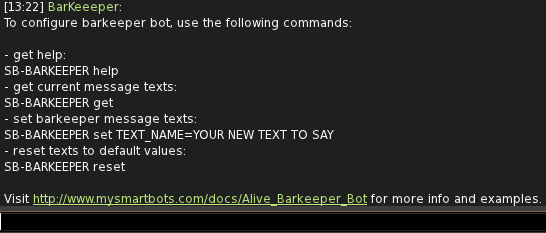
- SB-BARKEEPER set is explained below. It is used to change the default messages that the bot sends. To view a list of the messages please see the next tab and to get a description of them scroll down.
- SB-BARKEEPER reset changes back all options to default.
Typing "SB-BARKEEPER get" will provide you with a list of the current available messages, their current settings and instructions on how to change them:
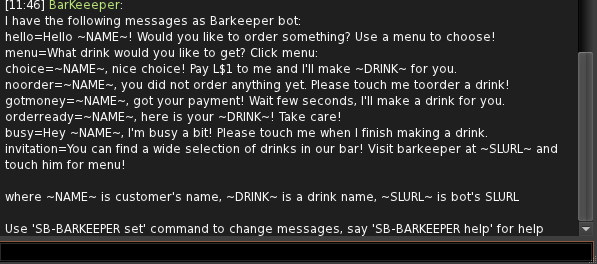
Please see below for a description of what each message does.
BARKEEPER Messages
Below is a table of the available messages and a description what they do:
| Message | Description |
|---|---|
| hello | Message that is sent in local chat when someone touches the bot. |
| menu | Text that is shown in menu that is displayed when someone touches the bot. |
| choice | Message sent in local chat after someone makes their choice of drink. |
| noorder | Displayed if someone pays the bot without choosing a drink. |
| gotmoney | After they order their drink and pay the bot this message is displayed. |
| orderready | When the drink is made this message will display when the drink gets sent to the person. |
| busy | Displayed if someone else touches Barkeeper when he is making a drink. |
| invitation | Message that is shouted at a set time interval. |
To change a message type "SB-BARKEEPER set message= your message here". Replace "your message here" with what you want the bot to send. For eg changing the hello message:
SB-BARKEEPER set hello= Hello Nice to meet you!
Barkeeper will then provide a confirmation message saying that the option has been changed.
Additional Commands
Disabling the Invitation Message
Barkeeper automatically invites nearby avatars to buy a drink by sending an "invitation" message. You can change this message or completely disable automatic invitation by setting the message to empty:
"SB-BARKEEPER set invitation="
Changing the Invitation Message Timer
The invite message is sent continuously as long as the bot is logged in or it the invitation message is not disabled.
To change how often the message gets sent out type "SB-BARKEEPER set shout_interval=minutes-minutes". For eg:
SB-BARKEEPER set shout_interval=10-15
<<Go Back to Alive Barkeeper