SSTI Hippo Rental Reminder
|
|
|||
| (3 intermediate revisions not shown) | |||
| Line 1: | Line 1: | ||
| - | SSTI server is able to notify your tenants when their rental is about to expire (or already expired). |
+ | SSTI server is able to notify your tenants when their rental is about to expire (or has already expired). |
| - | This can be done by using '''EXPIRE REMINDER''' option in SSTI config notecard. |
+ | This can be done by using the '''EXPIRE REMINDER''' option in SSTI config notecard. |
== Usage == |
== Usage == |
||
| Line 10: | Line 10: | ||
where: |
where: |
||
| - | * ''rental-days-left'' is |
+ | * ''rental-days-left'' is the number of rental days remaining |
| - | * ''message-to-send'' is |
+ | * ''message-to-send'' is the message to send |
You can set as much reminders as you need, each on a separate line. |
You can set as much reminders as you need, each on a separate line. |
||
| Line 26: | Line 26: | ||
=== Days in arrears === |
=== Days in arrears === |
||
| - | To send reminders to tenants in arrears, set the '''negative''' number |
+ | To send reminders to tenants in arrears, set the number of days to a '''negative''' number . Example: |
EXPIRE REMINDER = -1|You are 1 day arrears your rental! |
EXPIRE REMINDER = -1|You are 1 day arrears your rental! |
||
| - | === |
+ | === Multi-line IMs === |
| - | To send |
+ | To send a multi-line Instant Message use this character: ¶ |
EXPIRE REMINDER = 1|This is a first line of the IM.¶ This is a second line. |
EXPIRE REMINDER = 1|This is a first line of the IM.¶ This is a second line. |
||
| Line 40: | Line 40: | ||
The reminder message is being delivered directly from the bot managing your group. |
The reminder message is being delivered directly from the bot managing your group. |
||
| - | IMPORTANT: The reminders are being checked '''once a hour'''. So, if |
+ | IMPORTANT: The reminders are being checked '''once a hour'''. So, if the tenants time changes to 1 day remaining, he will get a reminder within next 60 minutes. |
== Testing your reminders == |
== Testing your reminders == |
||
| Line 48: | Line 48: | ||
# Setup the 6th-day reminder and then rent a box with your alt. The hover text will display "Remaining: 6 days" and you'll get a notification within a hour. |
# Setup the 6th-day reminder and then rent a box with your alt. The hover text will display "Remaining: 6 days" and you'll get a notification within a hour. |
||
# Setup a 1-day reminder, then rent a box with your alt. |
# Setup a 1-day reminder, then rent a box with your alt. |
||
| - | ## touch the Hippo box with owner avatar, |
+ | ## touch the Hippo box with the owner of the box's avatar, |
| - | ## click "Edit" |
+ | ## click "Edit", then "Length" from the menu
|
## set the remaining time to 1 day |
## set the remaining time to 1 day |
||
## You will also get a notification within 60 minutes. |
## You will also get a notification within 60 minutes. |
||
| + | # By touching your SSTI server and clicking on the "Test remndr" button:[[Image:SSTI reminder test.png|center|link=|border]] |
||
| - | [Category: SmartShare Tenant Inviter] |
+ |
[[Category: SmartShare Tenant Inviter]] |
__NOTOC__ |
__NOTOC__ |
||
Latest revision as of 17:07, 31 March 2013
SSTI server is able to notify your tenants when their rental is about to expire (or has already expired).
This can be done by using the EXPIRE REMINDER option in SSTI config notecard.
Usage
The option format is the following:
EXPIRE REMINDER = rental-days-left|message-to-send
where:
- rental-days-left is the number of rental days remaining
- message-to-send is the message to send
You can set as much reminders as you need, each on a separate line.
Variables
message-to-send can contain special variables which will be replaced with actual values:
- %DAYS% - the number of days remaining
- %SLURL% - the SLUrl of the box (to allow quick teleports for customer)
- %TENANT% - full tenant name (e.g. "Glaznah Gassner" or "Tenant Resident")
- %TENANT_FNAME% - tenant's first name (e.g. "Glaznah" or "Tenant")
Days in arrears
To send reminders to tenants in arrears, set the number of days to a negative number . Example:
EXPIRE REMINDER = -1|You are 1 day arrears your rental!
Multi-line IMs
To send a multi-line Instant Message use this character: 
EXPIRE REMINDER = 1|This is a first line of the IM.¶ This is a second line.
Delivery
The reminder message is being delivered directly from the bot managing your group.
IMPORTANT: The reminders are being checked once a hour. So, if the tenants time changes to 1 day remaining, he will get a reminder within next 60 minutes.
Testing your reminders
You may want to test the reminders with your alt. There are several ways to do this:
- Setup the 6th-day reminder and then rent a box with your alt. The hover text will display "Remaining: 6 days" and you'll get a notification within a hour.
- Setup a 1-day reminder, then rent a box with your alt.
- touch the Hippo box with the owner of the box's avatar,
- click "Edit", then "Length" from the menu
- set the remaining time to 1 day
- You will also get a notification within 60 minutes.
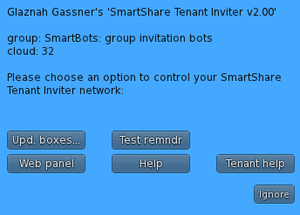
- By touching your SSTI server and clicking on the "Test remndr" button: