
SSTI Config Notecard
|
|
|||
| (4 intermediate revisions not shown) | |||
| Line 6: | Line 6: | ||
{{Generic 2-table group|Group config}} |
{{Generic 2-table group|Group config}} |
||
|- class="row-b" |
|- class="row-b" |
||
| - | |''' |
+ | |'''GROUP NAME''' |
|This is the name of the group, it must be exactly the same as it is on the website. |
|This is the name of the group, it must be exactly the same as it is on the website. |
||
|- class="row-b" |
|- class="row-b" |
||
| - | |''' |
+ | |'''SECRET CODE''' |
|This is the Security Code for the group that was set earlier. See [[Security code]]. |
|This is the Security Code for the group that was set earlier. See [[Security code]]. |
||
{{Generic 2-table group|Guest/partners config}} |
{{Generic 2-table group|Guest/partners config}} |
||
|- class="row-b" |
|- class="row-b" |
||
| - | |''' |
+ | |'''MAX PARTNERS''' |
|Maximum number of partners each tenant can have. Default is 2. |
|Maximum number of partners each tenant can have. Default is 2. |
||
|- class="row-b" |
|- class="row-b" |
||
| - | |''' |
+ | |'''MAX GUESTS''' |
|Maximum number of guests each tenant can have. Default is 3. |
|Maximum number of guests each tenant can have. Default is 3. |
||
|- class="row-b" |
|- class="row-b" |
||
| - | |''' |
+ | |'''ROLE NAMES''' |
|These are the roles that the bot will invite the different persons to. |
|These are the roles that the bot will invite the different persons to. |
||
| Line 29: | Line 29: | ||
|- class="row-b" |
|- class="row-b" |
||
|'''EXPIRE REMINDER''' |
|'''EXPIRE REMINDER''' |
||
| - | | |
+ | |Use this option to send expiration reminders to your tenants: |
| - | ''days-to-remind''|''Message-to-send''<br> |
+ |
EXPIRE REMINDER = ''days-to-remind''|''Message-to-send''<br> |
See [[SSTI Hippo Rental Reminder]] for more info. |
See [[SSTI Hippo Rental Reminder]] for more info. |
||
| - | |||
| - | |||
| - | |||
| - | |||
| - | |||
{{Generic 2-table group|Multiple installations}} |
{{Generic 2-table group|Multiple installations}} |
||
|- class="row-b" |
|- class="row-b" |
||
| - | |''' |
+ | |'''CLOUD''' |
|This is used if you are using more than one server on a sim |
|This is used if you are using more than one server on a sim |
||
{{Generic table end}} |
{{Generic table end}} |
||
Latest revision as of 18:27, 2 April 2013
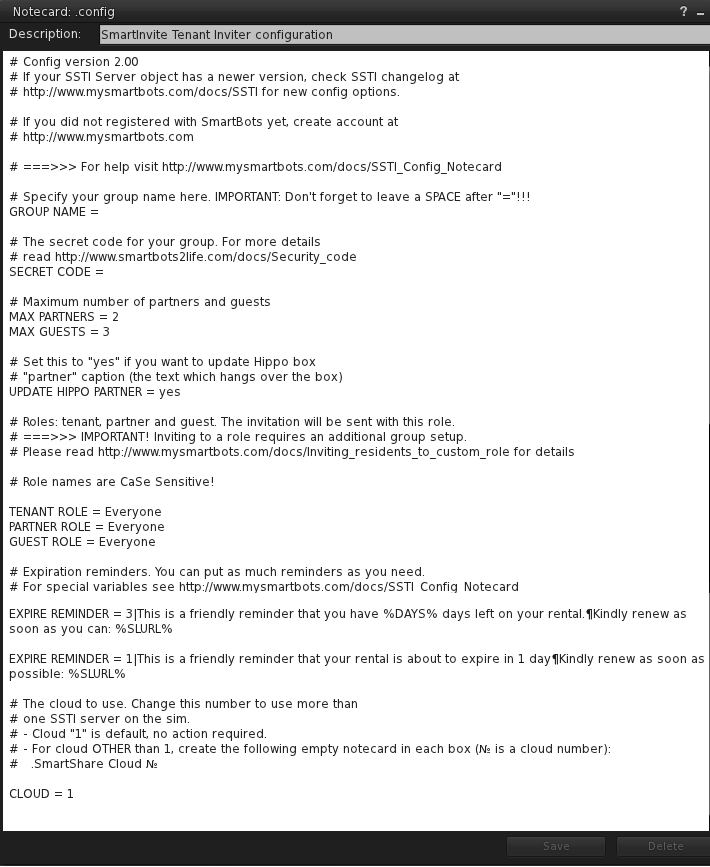
For SSTI to function properly you need to edit the configuration note card by filling out the different variables:
| Variable | Description | |
|---|---|---|
Group config |
||
| GROUP NAME | This is the name of the group, it must be exactly the same as it is on the website. | |
| SECRET CODE | This is the Security Code for the group that was set earlier. See Security code. | |
Guest/partners config |
||
| MAX PARTNERS | Maximum number of partners each tenant can have. Default is 2. | |
| MAX GUESTS | Maximum number of guests each tenant can have. Default is 3. | |
| ROLE NAMES | These are the roles that the bot will invite the different persons to. | |
Reminders |
||
| EXPIRE REMINDER | Use this option to send expiration reminders to your tenants:
EXPIRE REMINDER = days-to-remind|Message-to-send |
|
Multiple installations |
||
| CLOUD | This is used if you are using more than one server on a sim | |
To configure SSTI simply edit the variables to your suiting and click save. The device will reboot with the new configuration.