
How to set up the group fees
|
m
|
|||
| Line 14: | Line 14: | ||
# Configure your group and set "Cost to join" value |
# Configure your group and set "Cost to join" value |
||
# Make sure that your bot does '''NOT''' have the ability named "Pay group liabilities and receive group dividends" |
# Make sure that your bot does '''NOT''' have the ability named "Pay group liabilities and receive group dividends" |
||
| - | # Make sure that "Everybody" role of your group does '''NOT''' have that ability as well. |
+ | # Make sure that the "Everybody" role of your group does '''NOT''' have that ability as well. |
# Enable that ability for yourself and, probably, for your officers. |
# Enable that ability for yourself and, probably, for your officers. |
||
This setup ensures that only the group owner receives the group enrollment fees. |
This setup ensures that only the group owner receives the group enrollment fees. |
||
Latest revision as of 16:29, 4 November 2015
You may want to receive a group fee from every member joining the group.
This is can easily be done by configuring your group's "Cost to join" field:

However, you may want to know where that fee goes. The group fee processing scheme is the following:
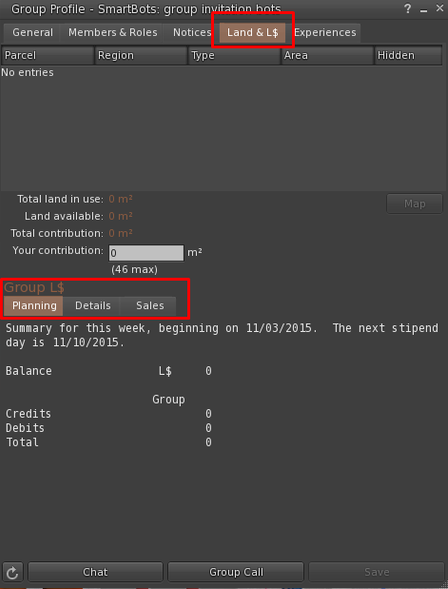
- All payments go to the "Group balance" which can be checked here:
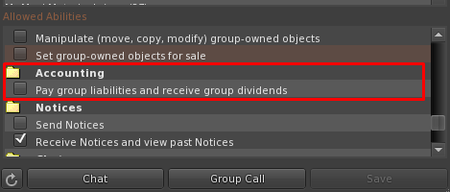
- Regularly, this balance is being distributed among the group members with the "Pay group liabilities and receive group dividends" ability:


Group fee setup instructions
- Configure your group and set "Cost to join" value
- Make sure that your bot does NOT have the ability named "Pay group liabilities and receive group dividends"
- Make sure that the "Everybody" role of your group does NOT have that ability as well.
- Enable that ability for yourself and, probably, for your officers.
This setup ensures that only the group owner receives the group enrollment fees.