
Group Chat Translator
|
QuincyJohnes (Talk | contribs)
(→Q: I've configured everything, bot still wont translate, what to do?)
|
|||
| (10 intermediate revisions not shown) | |||
| Line 1: | Line 1: | ||
| - | Group Chat Translator |
+ | Group Chat Translator automatically translates group chat from foreign languages to a language selected by you. The original language of the message is being determined automatically.
|
| + | |||
| + |
Group Chat Translator requires active SmartBots subscription and does not require any other payments. |
||
== How it Works == |
== How it Works == |
||
| - | + |
When a text is typed into the chat that is not in the desired language, Translator automatically processes it and displays the translation back in group chat: |
|
[[Image:TransEG.png|center|noframe|link=]] |
[[Image:TransEG.png|center|noframe|link=]] |
||
| - | [[Translator_Languages|Click |
+ |
If a message is typed into chat that is in the language you want other messages translated to, it will be ignored. [[Translator_Languages|Click here]] for a list of Languages that the translator can translate into. |
| - | + | ||
== Setting up The Device == |
== Setting up The Device == |
||
| - | Group Chat Translator can be configured by two easy ways. |
+ | First of all, you need to create account with SmartBots and list your group with [[Group Chat Translator]] service turned on. Click [[Group Chat Translator Service]] for more info. |
| + | |||
| + | The bot also requires the ability to join group chat for the translator to function. |
||
| + | |||
| + | When your SmartBots account is up and running, rez the Translator device and configure it. |
||
| + | |||
| + | Group Chat Translator can be configured by two easy ways. The first way uses configuration notecard and second way utilizes pop-up menus.
|
||
| + | |||
| + |
<div class=blocksMenuAuto> |
||
| + | * A. Config notecard |
||
| + | * B. Pop-up dialog |
||
| + |
</div> |
||
| + | |||
| + | <div class=blocksMenuAutoBlock> |
||
| + |
Edit _config notecard and specify the required values: |
||
[[Image:TransConfig.png|center|noframe|400px|link=]] |
[[Image:TransConfig.png|center|noframe|400px|link=]] |
||
| - | + |
The steps are simple and you just fill out your group name, [[Security code]] and type in the desired language. |
|
| + | </div> |
||
| - | |||
| + | <div class=blocksMenuAutoBlock> |
||
| + | The configuration dialog appears when you rez the device for the first time. You need to specify your group name and [[Security code]]: |
||
| + | [[Image:Trans1.png|link=]] [[Image:Trans2.png|link=]] |
||
| + | All you do is type in the required information (Group name or secret code) and press "Submit" button. |
||
| - | == |
+ | Afterwards you can change the language by click on the device and selecting "Chang Lang" or by editing the note card manually. |
| + | </div> |
||
| + | == FAQ == |
||
These are some of the most frequently asked questions about the Group Chat Translator: |
These are some of the most frequently asked questions about the Group Chat Translator: |
||
| - | + |
==== Q: I've heard that Google Translator is not free. Does the SmartBots Translator still work? ====
|
|
| + | Yes, our translator works. It uses both Google paid subscription and Microsoft engines to ensure smooth translation.
|
||
| + | |||
| + | ==== Q: Can I take the device to my inventory? ==== |
||
| + | No, the device should stay rezzed in order to work. |
||
| + | |||
| + | ==== Q: Does it matter where I rez the Translator device? ==== |
||
| + | You can rez the translator anywhere, you just need a run-script permission on the parcel. |
||
| + | |||
| + | ==== Q: I've configured everything, bot still wont translate, what to do? ==== |
||
| + | After first time configuration, processing time of translator may need from 1 up to 2 hours maximum. If you will be experiencing same problem anyway, contact our [https://mysmartbots.com/en/contacts.html 24/7 Live Chat Support] |
||
| + | |||
| + | == Trying the Translator in Second Life == |
||
| + | |||
| + | Group Chat Translator works in SmartBots official SL group ("SmartBots: group invitation bots"). Teleport to [http://slpano.com/secondlife/smartbots SmartBots office] to get invitation. |
||
| + | |||
| + |
Feel free to type your message in any language other than English. |
||
| - | + | == Get Translator Device == |
|
| - | + |
The translator device is available on the [https://marketplace.secondlife.com/p/Automatic-Group-Chat-Translator/2878104 SL MarketPlace] for 0l. |
|
__NOTOC__ |
__NOTOC__ |
||
Latest revision as of 18:25, 30 November 2018
Group Chat Translator automatically translates group chat from foreign languages to a language selected by you. The original language of the message is being determined automatically.
Group Chat Translator requires active SmartBots subscription and does not require any other payments.
How it Works
When a text is typed into the chat that is not in the desired language, Translator automatically processes it and displays the translation back in group chat:
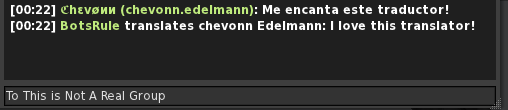
If a message is typed into chat that is in the language you want other messages translated to, it will be ignored. Click here for a list of Languages that the translator can translate into.
Setting up The Device
First of all, you need to create account with SmartBots and list your group with Group Chat Translator service turned on. Click Group Chat Translator Service for more info.
The bot also requires the ability to join group chat for the translator to function.
When your SmartBots account is up and running, rez the Translator device and configure it.
Group Chat Translator can be configured by two easy ways. The first way uses configuration notecard and second way utilizes pop-up menus.
- A. Config notecard
- B. Pop-up dialog
Edit _config notecard and specify the required values:
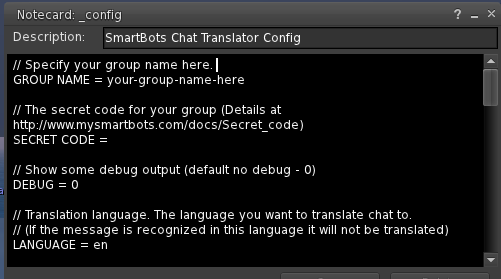
The steps are simple and you just fill out your group name, Security code and type in the desired language.
The configuration dialog appears when you rez the device for the first time. You need to specify your group name and Security code:
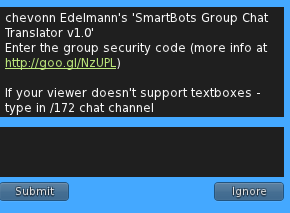
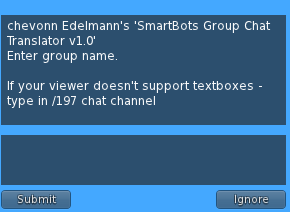
All you do is type in the required information (Group name or secret code) and press "Submit" button.
Afterwards you can change the language by click on the device and selecting "Chang Lang" or by editing the note card manually.
FAQ
These are some of the most frequently asked questions about the Group Chat Translator:
Q: I've heard that Google Translator is not free. Does the SmartBots Translator still work?
Yes, our translator works. It uses both Google paid subscription and Microsoft engines to ensure smooth translation.
Q: Can I take the device to my inventory?
No, the device should stay rezzed in order to work.
Q: Does it matter where I rez the Translator device?
You can rez the translator anywhere, you just need a run-script permission on the parcel.
Q: I've configured everything, bot still wont translate, what to do?
After first time configuration, processing time of translator may need from 1 up to 2 hours maximum. If you will be experiencing same problem anyway, contact our 24/7 Live Chat Support
Trying the Translator in Second Life
Group Chat Translator works in SmartBots official SL group ("SmartBots: group invitation bots"). Teleport to SmartBots office to get invitation.
Feel free to type your message in any language other than English.
Get Translator Device
The translator device is available on the SL MarketPlace for 0l.