
Alive Barkeeper Bot
|
QuincyJohnes (Talk | contribs)
|
|||
| (2 intermediate revisions not shown) | |||
| Line 7: | Line 7: | ||
[https://www.youtube.com/watch?v=7ol2hZkNKnM Video Tutorial & Documentation Here] |
[https://www.youtube.com/watch?v=7ol2hZkNKnM Video Tutorial & Documentation Here] |
||
| - | Alive Barkeeper Bot is |
+ |
'''Alive Barkeeper Bot''' is an add-on that allow [[Personal_Bots|Personal Bots]] to become barkeepers for your location, making it more lively. |
| - | + |
The principle of work behind the add-on is very simple. |
|
| - | + |
'''How it works:'''
|
|
| + | # Visitor teleports to your location |
||
| + | # Clicks barkeeper & receives drink menu |
||
| + | # Selects a drink & pays the barkeeper |
||
| - | == Features == |
+ | Afterwards, Barkeeper shakes up some drink and sends it over to the visitor! |
| + | |||
| + | == Major Features == |
||
Alive Barkeeper has the following features: |
Alive Barkeeper has the following features: |
||
| - | * |
+ | * Comes with '''configurable''' local chat messages
|
| - | * |
+ | * Records '''purchased drink payments''' in one page
|
| - | * |
+ |
* Allows you to create your own menu of drinks
|
| - | * |
+ | * Includes set of pre-made drinks
|
| - | + | * Includes instruction board for your visitors
|
|
| - | + | ||
| + |
You can check out the demonstration bot at our [http://slurl.com/secondlife/DuoLife/217/134/32/ in-world office] |
||
| + | |||
| + | == Summary page == |
||
| - | + |
[[File:Barkeeper_summary_page.png|center|link=|border|550px]]
|
|
| - | + | Barkeeper now includes a summary page to allow you easier navigation to pages. |
|
| - | + |
* Setup a drink price!
|
|
| + | * Configure barkeeper's messages |
||
| + |
* Manage your drink menus
|
||
| - | + | == Barkeeper inventory ==
|
|
| - | + |
[[File:Barkeeper_drink_page_2.png|center|link=|border|550px]]
|
|
| - | + |
Barkeeper add-on allows you to create your own inventory and set of drinks. It also comes with default set of pre-made drinks, in-case you do not have some of your own. |
|
| - | + |
[https://mysmartbots.com/docs/Setting_up_barkeeper_inventory >> Read more about setting up barkeeper inventory]
|
|
| - | == |
+ | == Barkeeper messages == |
| - | + | [[File:Barkeeper_message_page.png|center|link=|border|550px]] |
|
| - | + | Your barkeeper can send out messages through the whole process of bar-tending (from greeting to finishing up a drink!) - you can configure each message of the process! |
|
| - | + |
[https://mysmartbots.com/docs/Setting_up_barkeeper_messages >> Read more about setting up barkeeper messages] |
|
| + | == How to purchase == |
||
| - | + | See the [[Purchasing Add-Ons]] page for step-by-step add-on activation instructions. |
|
| - | + | == Additional information ==
|
|
| - | + | ||
| - | + | # This add-on can be used only with a [[Personal Bots|Personal Bot]]. |
|
| + |
# You can refund your add-on purchase within 3 days. |
||
__NOTOC__ |
__NOTOC__ |
||
Latest revision as of 23:08, 31 May 2019
This is a bot add-on:
- Buy in web Bot Store
- Then attach to your bot
Video Tutorial & Documentation Here
Alive Barkeeper Bot is an add-on that allow Personal Bots to become barkeepers for your location, making it more lively.
The principle of work behind the add-on is very simple.
How it works:
- Visitor teleports to your location
- Clicks barkeeper & receives drink menu
- Selects a drink & pays the barkeeper
Afterwards, Barkeeper shakes up some drink and sends it over to the visitor!
Major Features
Alive Barkeeper has the following features:
- Comes with configurable local chat messages
- Records purchased drink payments in one page
- Allows you to create your own menu of drinks
- Includes set of pre-made drinks
- Includes instruction board for your visitors
You can check out the demonstration bot at our in-world office
Summary page
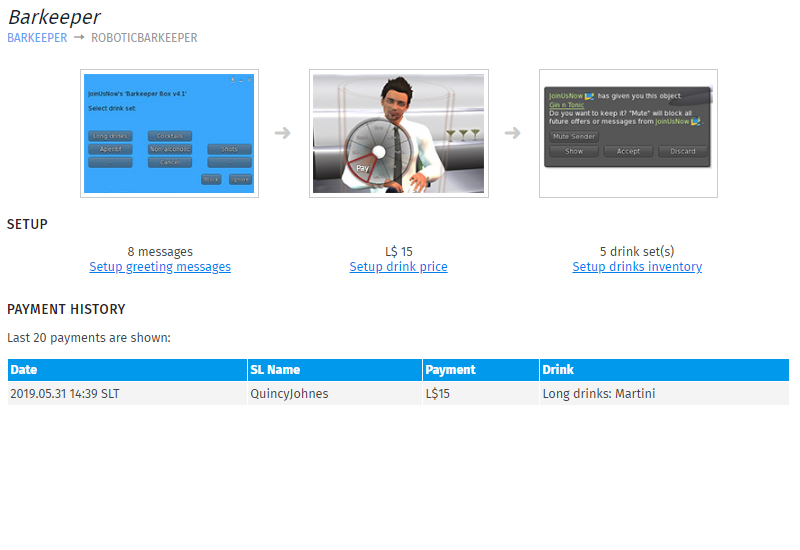
Barkeeper now includes a summary page to allow you easier navigation to pages.
- Setup a drink price!
- Configure barkeeper's messages
- Manage your drink menus
Barkeeper inventory
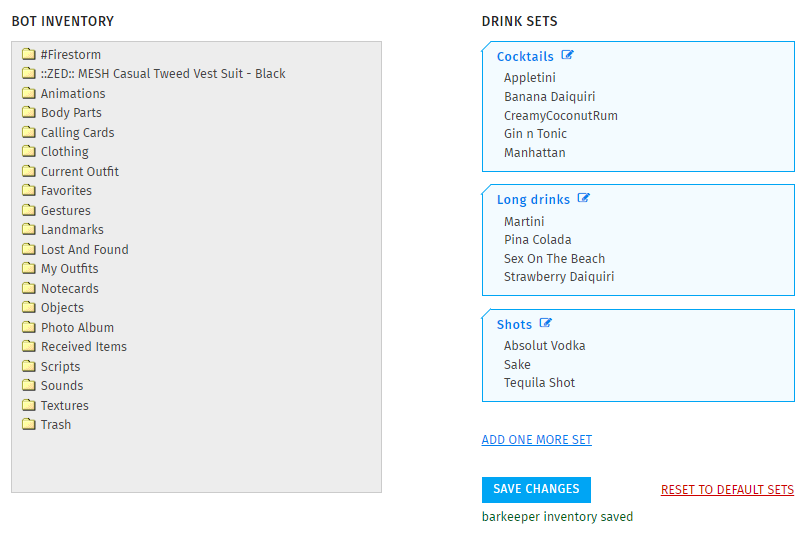
Barkeeper add-on allows you to create your own inventory and set of drinks. It also comes with default set of pre-made drinks, in-case you do not have some of your own.
>> Read more about setting up barkeeper inventory
Barkeeper messages
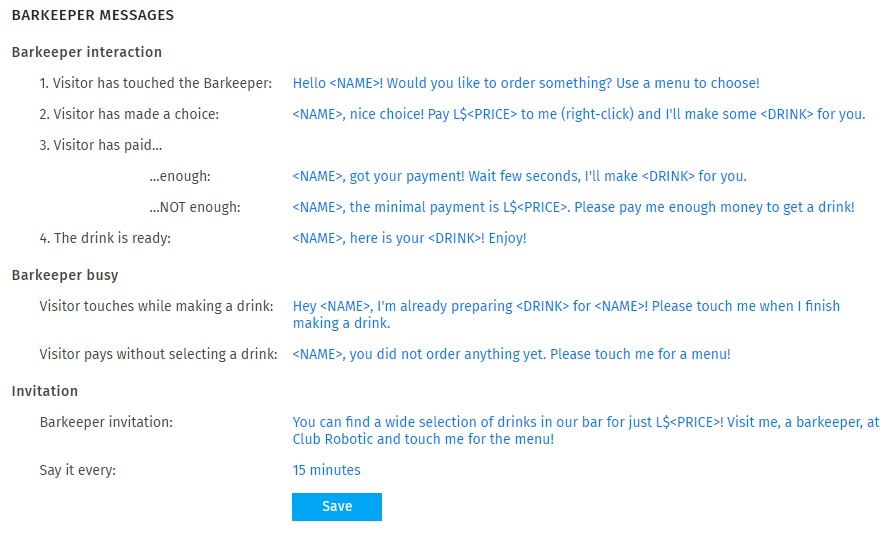
Your barkeeper can send out messages through the whole process of bar-tending (from greeting to finishing up a drink!) - you can configure each message of the process!
>> Read more about setting up barkeeper messages
How to purchase
See the Purchasing Add-Ons page for step-by-step add-on activation instructions.
Additional information
- This add-on can be used only with a Personal Bot.
- You can refund your add-on purchase within 3 days.