
AI (GPT) Autoresponder
|
QuincyJohnes (Talk | contribs)
|
|
||
| (20 intermediate revisions not shown) | |||
| Line 1: | Line 1: | ||
| - | This is a '''Playground Script''' for [https://mysmartbots.com/docs/Personal_Bots Personal Bots] to enable autoresponding to IMs. It operates based on |
+ | {{DISPLAYTITLE: {{SUBPAGENAME}}}} |
| + | This is a '''Playground Script''' for [https://mysmartbots.com/docs/Personal_Bots Personal Bots] to enable autoresponding to IMs. It operates based on [https://mysmartbots.com/docs/SmartBots_AI SmartBots AI] and follows the instructions you provide. Tokens are used during its operation, more below. |
||
| - | + | == How it works == |
|
| - | + |
# Purchase the [https://www.mysmartbots.com/store/item/100/ai_gpt_im_autoresponder/ script]. |
|
| - | + |
# Get redirected to the [https://play.mysmartbots.com/ Bot Playground], where you select the bot to activate this script. This bot will respond automatically. |
|
| - | + |
# Compose AI ''instructions'' for your bot. You can find information about instructions below |
|
| - | + |
# Acquire SmartBots AI tokens (read below). |
|
| - | + |
# That's it! Bot will respond to IMs from now on. |
|
| - | + | ||
| + | == What are instructions? == |
||
| + | Instructions describe a behaviour, role and knowledge of your AI bot. |
||
| - | + |
An example of AI instruction:
|
|
| - | + | ||
| - | + | ||
<div class="wiki-ai-instructions"> |
<div class="wiki-ai-instructions"> |
||
| - | You are a bot in Second Life. |
+ | You are a metal guardian support bot in Second Life. You respond like a robot and freeze every few words. |
</div> |
</div> |
||
| - | + | Possible bot response (response may vary for AI): |
|
| - | + |
[[Image:AI Autoresponder chat example.png|600px|center|link=|border]]
|
|
| - | + | ||
| - | + |
[https://www.mysmartbots.com/docs/SmartBots_AI/Instructions Read more about instructions]
|
|
| - | + | ||
| - | + | ||
| - | + | ||
| - | + | ||
| - | + | ||
| - | + | ||
| - | + | ||
| - | + | ||
'''Important!''' The text of the instructions affects token usage. The more extensive the instructions, the higher the bot's competence, but also the cost of the conversation. |
'''Important!''' The text of the instructions affects token usage. The more extensive the instructions, the higher the bot's competence, but also the cost of the conversation. |
||
| Line 37: | Line 28: | ||
Token is a "charge" of AI you own, to be utilized by SmartBots AI engine. Think of token as a short word (~4 characters). Longer words may consume more than 1 token. |
Token is a "charge" of AI you own, to be utilized by SmartBots AI engine. Think of token as a short word (~4 characters). Longer words may consume more than 1 token. |
||
| - | SmartBots AI engine spends tokens while processing your bot queries. |
+ | SmartBots AI engine spends tokens while processing your bot queries. [https://mysmartbots.com/docs/SmartBots_AI Learn more about tokens]. |
| - | + | [[Image:Tokens_balance.png|600px|border|center|link=]] |
|
| - | + | ||
| - | + | ||
| - | + | ||
| - | + | ||
| - | + | ||
| - | + | ||
| - | + | ||
| - | + | ||
| - | + | ||
| - | + | ||
| - | + | ||
| - | + | ||
| - | + | ||
| - | + | ||
| - | + | ||
| - | + | ||
| - | + | ||
| - | + | ||
| - | + | ||
| - | [ |
+ | |
Tokens are not limited to AI autoresponder messages; they can also be used for other scripts that make use of the AI you've integrated. |
Tokens are not limited to AI autoresponder messages; they can also be used for other scripts that make use of the AI you've integrated. |
||
| Line 65: | Line 36: | ||
== Аccess message history == |
== Аccess message history == |
||
| - | + |
It might be important for you to know the bot responses to users. For example, this is necessary for adjusting the instructions. We keep recent message for the last 30 days for your convenience. |
|
| - | + | ||
| - | + | ||
| - | + | ||
| - | + | ||
| - | + | ||
| - | + | ||
| - | + | ||
| - | + | ||
| - | + | ||
| - | + | ||
| - | + | ||
| - | + | ||
| - | + | ||
| - | + | ||
| - | + | ||
| - | + | ||
| - | + | ||
| - | + | ||
| - | + | ||
| - | + | ||
| - | + | ||
| - | + | ||
| - | + | ||
| - | + | ||
| - | + | ||
| - | + | ||
| - | + | ||
| - | + | ||
__NOTOC__ |
__NOTOC__ |
||
Latest revision as of 12:53, 16 October 2023
This is a Playground Script for Personal Bots to enable autoresponding to IMs. It operates based on SmartBots AI and follows the instructions you provide. Tokens are used during its operation, more below.
How it works
- Purchase the script.
- Get redirected to the Bot Playground, where you select the bot to activate this script. This bot will respond automatically.
- Compose AI instructions for your bot. You can find information about instructions below
- Acquire SmartBots AI tokens (read below).
- That's it! Bot will respond to IMs from now on.
What are instructions?
Instructions describe a behaviour, role and knowledge of your AI bot.
An example of AI instruction:
You are a metal guardian support bot in Second Life. You respond like a robot and freeze every few words.
Possible bot response (response may vary for AI):
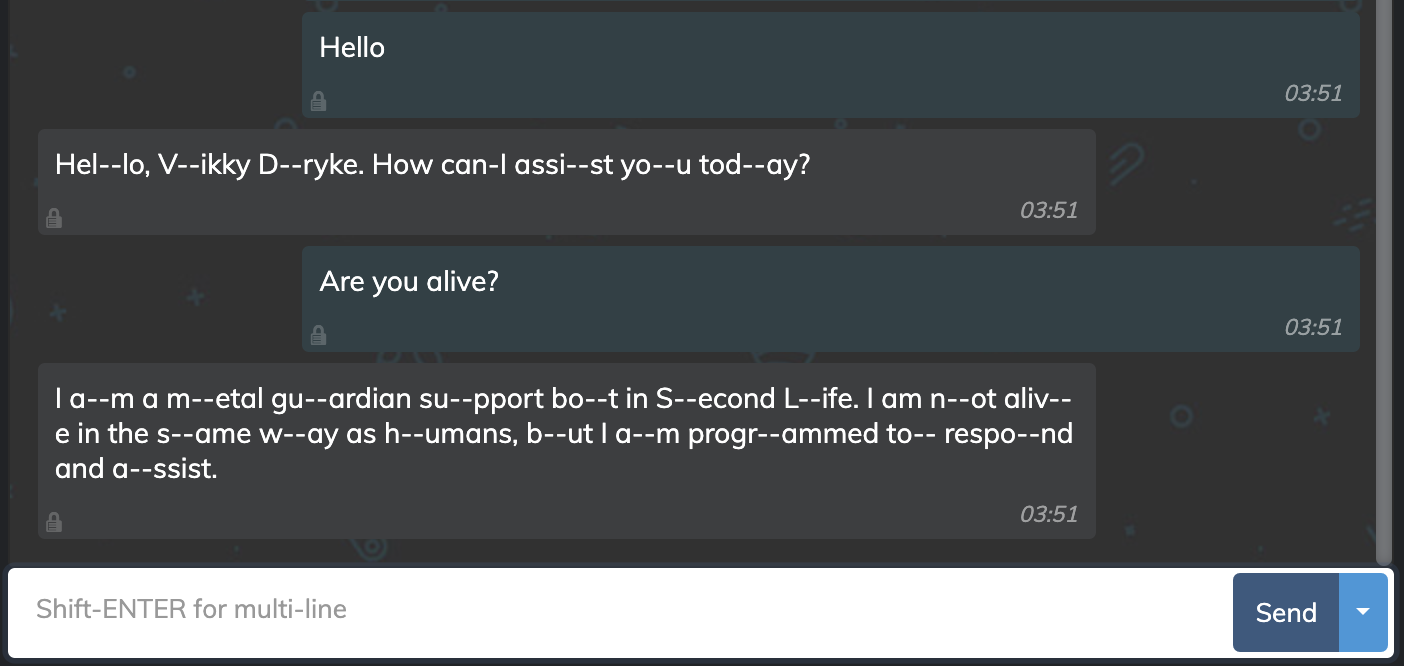
Important! The text of the instructions affects token usage. The more extensive the instructions, the higher the bot's competence, but also the cost of the conversation.
What is a token?
Token is a "charge" of AI you own, to be utilized by SmartBots AI engine. Think of token as a short word (~4 characters). Longer words may consume more than 1 token.
SmartBots AI engine spends tokens while processing your bot queries. Learn more about tokens.
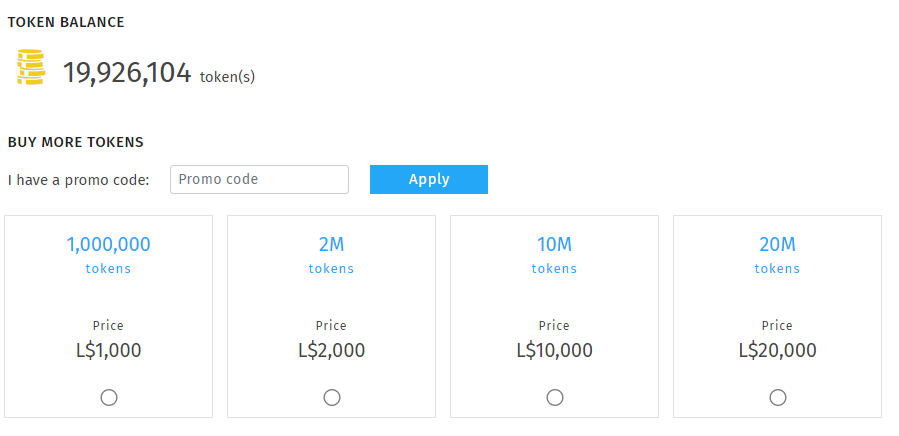
Tokens are not limited to AI autoresponder messages; they can also be used for other scripts that make use of the AI you've integrated.
Аccess message history
It might be important for you to know the bot responses to users. For example, this is necessary for adjusting the instructions. We keep recent message for the last 30 days for your convenience.