
GAB Configuration
| Line 3: | Line 3: | ||
== How to configure GAB == |
== How to configure GAB == |
||
| - | To Configure GAB edit the configuration notecard and fill in the blanks with the required information. Note that GAB also uses your |
+ | To Configure GAB edit the configuration notecard and fill in the blanks with the required information. Note that GAB also uses your group [[Security code]]. |
[[File:GAB_CONFIG.jpg|link=|center]] |
[[File:GAB_CONFIG.jpg|link=|center]] |
||
| - | When you are editing the Message part of the notecard ensure that ~ANSWER~ is always included or |
+ | When you are editing the Message part of the notecard ensure that ~ANSWER~ is always included or there wont be any number to enter into the device. |
| - | + |
'''Answer''': This is a random 6 digit code generated by the machine eg 439-582. If it is left out of the message when persons touch the device they will be prompt to enter a code they do not know.
|
|
| + | |||
| + |
'''SLURL''': This is the location of the GAB device that is automatically recorded when rezzed and is sent along with the message if it is included in the message setup text. If it is not included persons can tp to your parcel and search for the device.
|
||
| + | |||
| + | '''AMOUNT''' This is the amount that each visitor will get paid which is set down at the bottom of the config notecard. |
||
Revision as of 13:57, 20 August 2012
GAB Configuration
How to configure GAB
To Configure GAB edit the configuration notecard and fill in the blanks with the required information. Note that GAB also uses your group Security code.
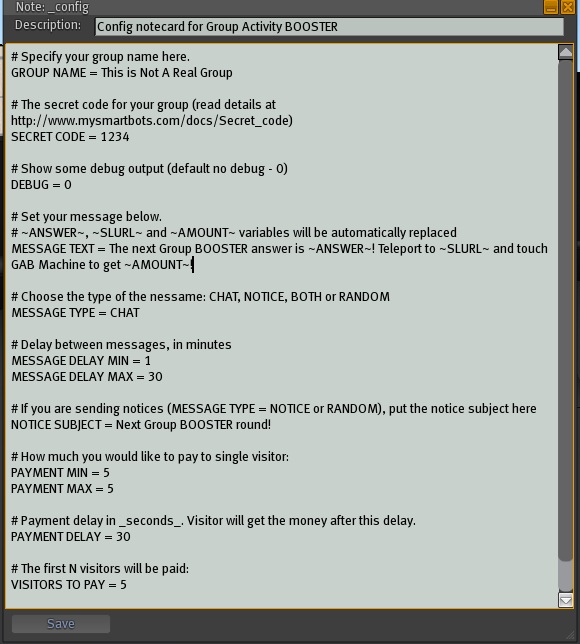
When you are editing the Message part of the notecard ensure that ~ANSWER~ is always included or there wont be any number to enter into the device.
Answer: This is a random 6 digit code generated by the machine eg 439-582. If it is left out of the message when persons touch the device they will be prompt to enter a code they do not know.
SLURL: This is the location of the GAB device that is automatically recorded when rezzed and is sent along with the message if it is included in the message setup text. If it is not included persons can tp to your parcel and search for the device.
AMOUNT This is the amount that each visitor will get paid which is set down at the bottom of the config notecard.