
Setting up barkeeper messages
| Line 3: | Line 3: | ||
[[Image:Barkeeper configure 1.jpg|link=|center|border]] |
[[Image:Barkeeper configure 1.jpg|link=|center|border]] |
||
| - | == |
+ | == How to Configure BARKEEPER == |
Once you type "SB-BARKEEPER help" you will see a list of options: |
Once you type "SB-BARKEEPER help" you will see a list of options: |
||
| Line 9: | Line 9: | ||
[[File:BarConfig1.png|link=|center|border]] |
[[File:BarConfig1.png|link=|center|border]] |
||
| - | == Barkeeper's text messages == |
+ | |
| + |
=== Barkeeper's text messages ===
|
||
| + | |||
| + | Typing "SB-BARKEEPER get" will provide you with a list of the current available messages, their current settings and instructions on how to change them. |
||
| + | |||
| + | Below are a list of the available messages and what they do: |
||
| + | |||
| + | |||
== Automatic invitation == |
== Automatic invitation == |
||
Revision as of 22:26, 19 October 2012
Alive Barkeeper is being configured using IM messages. To start configuring your barkeeper, touch him:

How to Configure BARKEEPER
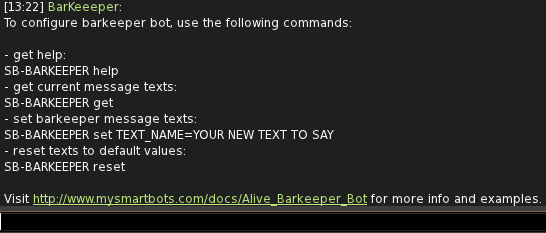
Once you type "SB-BARKEEPER help" you will see a list of options:
Barkeeper's text messages
Typing "SB-BARKEEPER get" will provide you with a list of the current available messages, their current settings and instructions on how to change them.
Below are a list of the available messages and what they do:
Automatic invitation
Barkeeper automatically invites nearby avatar to buy a drink by sending "invitation" message. You can change this message or completely disable automatic invitation by setting empty message:
SB-BARKEEPER set invitation=