
Enabling and Cancelling Services
| Line 3: | Line 3: | ||
With smartbots it is possible to enable or to cancel a service at any given time. |
With smartbots it is possible to enable or to cancel a service at any given time. |
||
| - | To do so simple log into your smarbots account and on the account dashboard locate the add/remove services button: |
+ | To do so simple log into your smarbots account and on the account dashboard locate the add/remove services button(assuming you already have your group listed with us): |
[[File:Enabling_services1.jpg|link=|center|600px]] |
[[File:Enabling_services1.jpg|link=|center|600px]] |
||
Revision as of 14:11, 11 December 2012
Enabling and Cancelling Services
With smartbots it is possible to enable or to cancel a service at any given time.
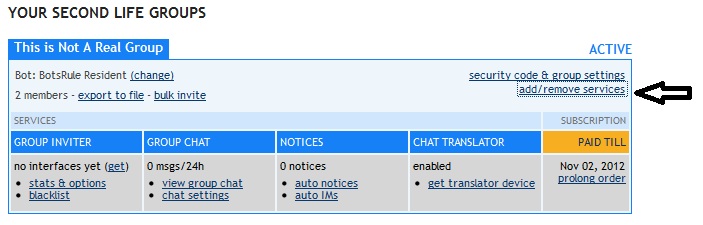
To do so simple log into your smarbots account and on the account dashboard locate the add/remove services button(assuming you already have your group listed with us):
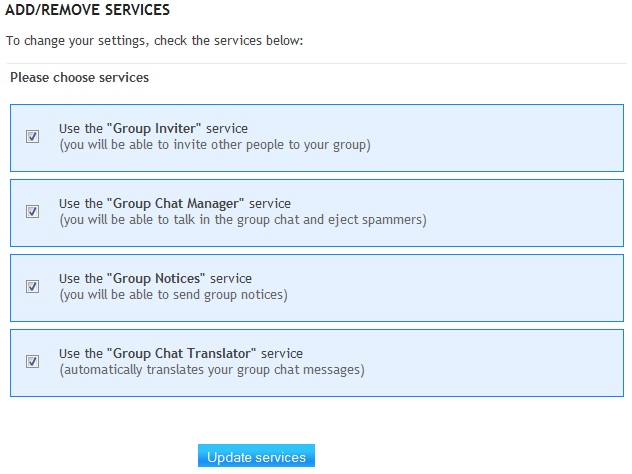
And then select the services you need and click update services:
Please note that if you remove a service while it is active (you paid for it already) you will not receive a refund so it is best to make sure you really want to remove it.
Click here to see how to activate other services (Bulk Invite, Group Export)