
Group Chat Control Service
| Line 1: | Line 1: | ||
| - | + | Group Chat Control service allows to participate in group chat using your browser (no SL viewer required). |
|
== Features == |
== Features == |
||
| - | * '''Listen and talk''': Read group chat |
+ | * {{#httpimg: image=http://www.smartbots2life.com/images/service_chat.jpg|class=imageRight}}'''Listen and talk''': Read group chat |
* Send chat messages |
* Send chat messages |
||
* '''Eject spammers''': Send warnings to particular members |
* '''Eject spammers''': Send warnings to particular members |
||
| Line 18: | Line 18: | ||
You may assign another resident(s) to moderate your chat. |
You may assign another resident(s) to moderate your chat. |
||
| - | '''Moderator''' account have access to the group chat only (it can't edit, create or delete SmartBots groups). |
+ | '''Moderator''' account have access to the group chat only (it can't edit, create or delete SmartBots groups). Moreover, all moderator's activity is logged, hence you can check your staff activity later. |
| - | + | ||
| - | Moreover, all moderator's activity is logged, hence you can check your staff activity later. |
+ | |
[[Category: Group Chat Control Service]] |
[[Category: Group Chat Control Service]] |
||
Revision as of 07:23, 29 October 2010
Group Chat Control service allows to participate in group chat using your browser (no SL viewer required).
Features
 Listen and talk: Read group chat
- Send chat messages
- Eject spammers: Send warnings to particular members
- Eject members from the group.
- Moderators: Create separate chat moderator accounts
- View moderator's activity
Chat control (Antispam)
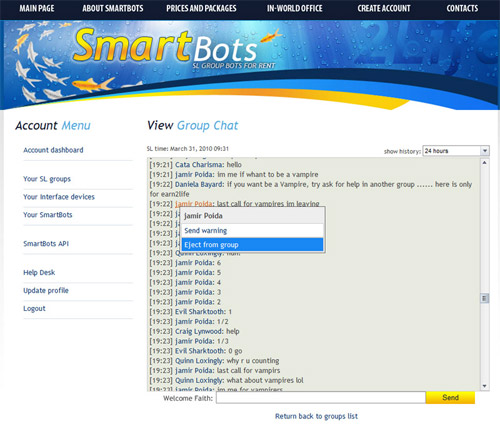
You can warn and eject spammers and abusers from your SL group.
This is easily done by using SmartBots group chat interface:
Moderators
You may assign another resident(s) to moderate your chat.
Moderator account have access to the group chat only (it can't edit, create or delete SmartBots groups). Moreover, all moderator's activity is logged, hence you can check your staff activity later.