
Enabling and Cancelling Services
|
(Created page with 'This section explains how to enable and disable SmartBots services. ''This section will be expanded in the near future'' Category: Existing customers')
|
(Page was blank but a page linked to it)
|
||
| Line 1: | Line 1: | ||
| - | + |
= Enabling and Cancelling Services =
|
|
| - | + | With smartbots it is possible to enable or to cancel a service at any given time. |
|
| + | |||
| + |
To do so simple log into your smarbots account and on the account dashboard locate the add/remove services button:
|
||
| + | |||
| + | [[File:Enabling_services1.jpg|link=|center|600px]] |
||
| + | |||
| + | And then select the services you need and click update services: |
||
| + | |||
| + | [[File:Enabling_services2.jpg|link=|center]] |
||
| + | |||
| + | |||
| + | Please note that if you remove a service while it is active (you paid for it already) you will not receive a refund so think twice before removing it. |
||
[[Category: Existing customers]] |
[[Category: Existing customers]] |
||
Revision as of 23:13, 14 August 2012
Enabling and Cancelling Services
With smartbots it is possible to enable or to cancel a service at any given time.
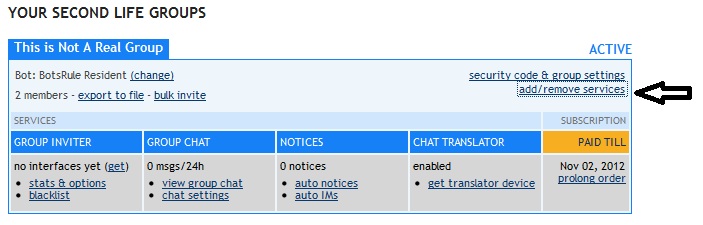
To do so simple log into your smarbots account and on the account dashboard locate the add/remove services button:
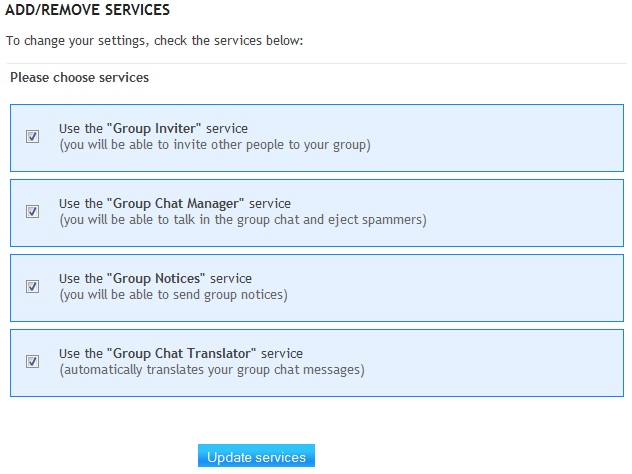
And then select the services you need and click update services:
Please note that if you remove a service while it is active (you paid for it already) you will not receive a refund so think twice before removing it.