
GAB Configuration
| Line 1: | Line 1: | ||
| - | + |
To configure GAB edit the configuration notecard and fill in the blanks with the required information. Note that GAB config requires your group [[Security code]].
|
|
| - | == |
+ | == Configuration == |
| - | + | ||
| - | + | ||
[[File:GAB_CONFIG.jpg|link=|center]] |
[[File:GAB_CONFIG.jpg|link=|center]] |
||
| - | The |
+ | The configuration options are pretty straightforward and well commented.
|
| + | |||
| + | === Variables === |
||
| + | |||
| + | There are few variables you can use in GAB "Message Text": |
||
| + | |||
| + |
* '''ANSWER''' - this is a random 6 digit code generated by the machine (e.g. 439-582). Visitors will be prompt to enter this code upon touching your GAB Machine.
|
||
| + |
* '''SLURL''': This is a current location of the GAB Machine. If not included, visitors can teleport to your parcel and search for the Machine.
|
||
| + | * '''AMOUNT''' This is the amount each visitor gets paid during the current round. |
||
| - | + | == More info == |
|
| - | + |
Read [[Group Activity BOOSTER]] article for more info. |
|
| - | + | [[Category:Devices]] |
|
Revision as of 16:53, 4 September 2012
To configure GAB edit the configuration notecard and fill in the blanks with the required information. Note that GAB config requires your group Security code.
Configuration
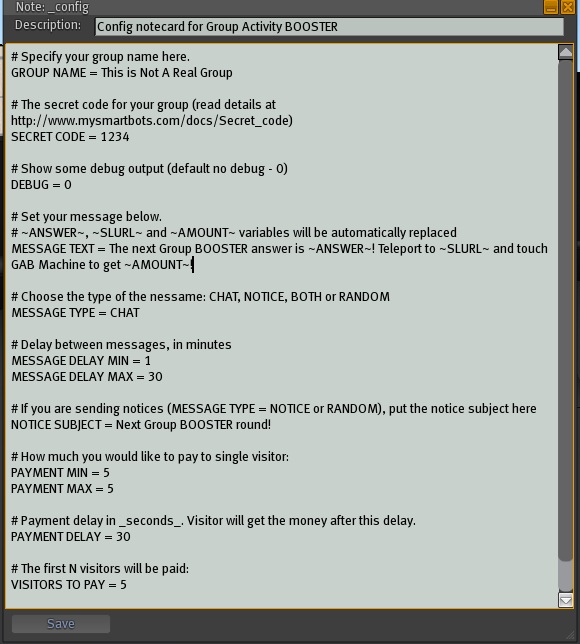
The configuration options are pretty straightforward and well commented.
Variables
There are few variables you can use in GAB "Message Text":
- ANSWER - this is a random 6 digit code generated by the machine (e.g. 439-582). Visitors will be prompt to enter this code upon touching your GAB Machine.
- SLURL: This is a current location of the GAB Machine. If not included, visitors can teleport to your parcel and search for the Machine.
- AMOUNT This is the amount each visitor gets paid during the current round.
More info
Read Group Activity BOOSTER article for more info.