
SSTI for tenants
| Line 1: | Line 1: | ||
| - | + |
As a tenant that has access to SSTI the following features will be available to you (depending on how your landlord has configured the device):
|
|
| - | * |
+ | |
| - | + |
*Invite guests into the group (so they can rez objects, enter the parcel etc
|
|
| + |
*Invite partners into the group (people who you share rent with) |
||
| + | *ReInvite your self to the group if you accidentally left (as long as you still have a valid rental period)
|
||
| + | *Eeject partners/guests from the group |
||
| + | |||
| + | == SSTI MENU == |
||
| + | |||
| + | The SSTI popup menu is displayed whenever you touch your rental box: |
||
| + | |||
| + | [[Image:SSTIMenu.png|center|border|link=|300px]] |
||
| + | |||
| + |
{{Generic 2-table start|Button|Description}}
|
||
| + | |||
| + | |- class="row-b" |
||
| + | |'''Invite''' |
||
| + |
|This allows you to invite a new partner/guest or reinvite yourself into the group
|
||
| + | |||
| + | |- class="row-b" |
||
| + | |'''Eject''' |
||
| + | |Allows you to eject a partner or guest from the group |
||
| + | |||
| + | |- class="row-b" |
||
| + | |'''List all''' |
||
| + |
|Shows a list of all your guests and partners in local chat
|
||
| + | |||
| + |
|- class="row-b"
|
||
| + | |'''Help''' |
||
| + |
|Sends you a notecard with instructions on how to use the menu |
||
| + | |||
| + | |- class="row-b" |
||
| + | |'''Hippo menu''' |
||
| + | |Disables the SSTI menu from appearing the next time you click it. Menu will be displayed if you click again. |
||
| + | |||
| + | {{Generic table end}} |
||
| + | |||
| + | == Additional Information == |
||
| + | *When inviting a friend use ONLY their real sl account name NOT their Display name (e.g. "Denis Resident" instead of "Super Man Denis") |
||
| + | |||
| + | *Remember that your landlord is able to track who is invited and who leaves/gets removed from the group. Your invitations are being logged. |
||
| + | |||
| + | *You are able to invite a limited number of partners and guests at a time. If you wish to invite more you will need to remove someone first |
||
| + | |||
| + | === Usage Tips === |
||
| + | |||
| + | #Make sure your guest is inworld so you can check if they have received the invite. |
||
| + | #Some residents using V2 dont see the group invite as it is hidden under notifications at the bottom right of their screen. |
||
| + | #Check that the resident has a spare slot for a group before sending an invite |
||
| + | #You may have to wait 1 minute after sending the invitation due to lag |
||
| + | #You can invite guests only by using your Hippo Rent Box |
||
| + | |||
[[Category: SmartShare Tenant Inviter]] |
[[Category: SmartShare Tenant Inviter]] |
||
__NOTOC__ |
__NOTOC__ |
||
Revision as of 02:06, 3 March 2013
As a tenant that has access to SSTI the following features will be available to you (depending on how your landlord has configured the device):
- Invite guests into the group (so they can rez objects, enter the parcel etc
- Invite partners into the group (people who you share rent with)
- ReInvite your self to the group if you accidentally left (as long as you still have a valid rental period)
- Eeject partners/guests from the group
SSTI MENU
The SSTI popup menu is displayed whenever you touch your rental box:
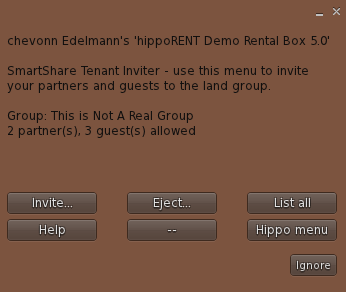
| Button | Description |
|---|---|
| Invite | This allows you to invite a new partner/guest or reinvite yourself into the group |
| Eject | Allows you to eject a partner or guest from the group |
| List all | Shows a list of all your guests and partners in local chat |
| Help | Sends you a notecard with instructions on how to use the menu |
| Hippo menu | Disables the SSTI menu from appearing the next time you click it. Menu will be displayed if you click again. |
Additional Information
- When inviting a friend use ONLY their real sl account name NOT their Display name (e.g. "Denis Resident" instead of "Super Man Denis")
- Remember that your landlord is able to track who is invited and who leaves/gets removed from the group. Your invitations are being logged.
- You are able to invite a limited number of partners and guests at a time. If you wish to invite more you will need to remove someone first
Usage Tips
- Make sure your guest is inworld so you can check if they have received the invite.
- Some residents using V2 dont see the group invite as it is hidden under notifications at the bottom right of their screen.
- Check that the resident has a spare slot for a group before sending an invite
- You may have to wait 1 minute after sending the invitation due to lag
- You can invite guests only by using your Hippo Rent Box