
How to Remove a group
Chevonn Edelmann (Talk | contribs)
(Created page with "When you no longer need a group you can remove it from your account. The following instructions shows how to do that: #Login to your smartbots account and look for the group yo...")
Newer edit →
(Created page with "When you no longer need a group you can remove it from your account. The following instructions shows how to do that: #Login to your smartbots account and look for the group yo...")
Newer edit →
Revision as of 03:57, 10 December 2013
When you no longer need a group you can remove it from your account.
The following instructions shows how to do that:
- Login to your smartbots account and look for the group you want to remove.
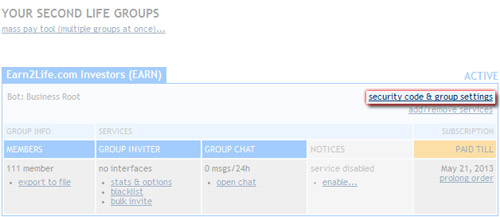
- Under your group name click "security code & group settings":
- Select the "Remove Group" tag:
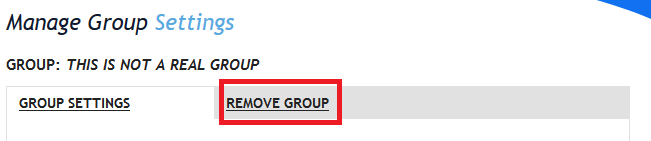
- Click the link that is shown
- Confirm you want to remove the group
The group has now been removed from your account dashboard and can no longer be controlled with smartbots unless you re-add it.
This only removes a group from your account dashboard, everything stays the same inworld.