
SSTI Config Notecard
For SSTI to function properly you need to edit the configuration note card by filling out the different variables:
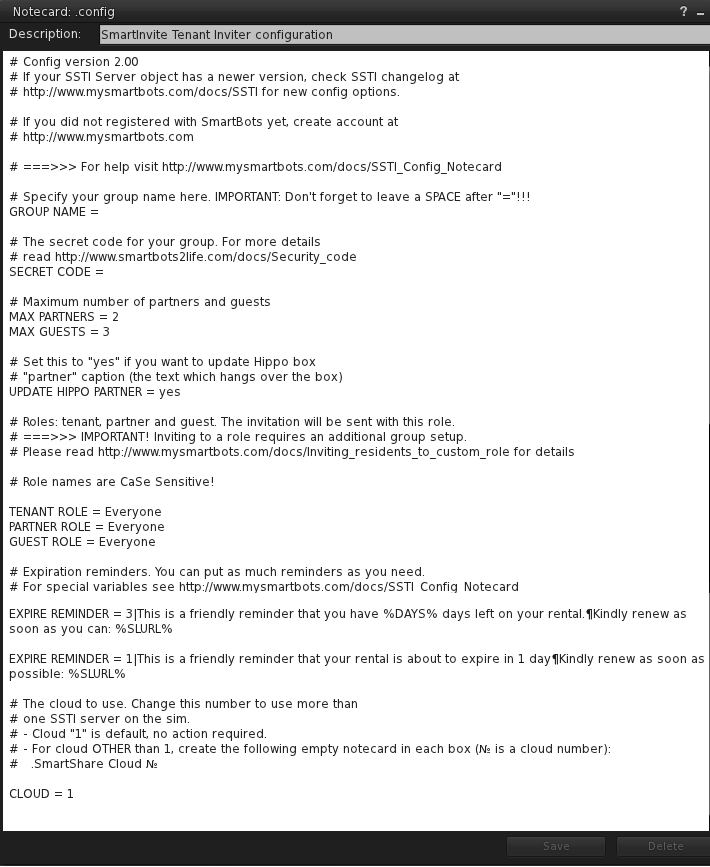
| Variable | Description | |
|---|---|---|
Group config |
||
| Group Name | This is the name of the group, it must be exactly the same as it is on the website. | |
| Secret Code | This is the Security Code for the group that was set earlier. See Security code. | |
Guest/partners config |
||
| Max Partners | Maximum number of partners each tenant can have. Default is 2. | |
| Max Guests | Maximum number of guests each tenant can have. Default is 3. | |
| Role Names | These are the roles that the bot will invite the different persons to. | |
Reminders |
||
| EXPIRE REMINDER | Set this option to send expiration reminders to your tenants:
days-to-remind|Message-to-send See SSTI Hippo Rental Reminder for more info. |
|
Management |
||
| MANAGER | The persons besides the owner who can access SSTI web stats.
You can specify several managers (see screenshot). |
|
Multiple installations |
||
| Cloud | This is used if you are using more than one server on a sim | |
To configure SSTI simply edit the variables to your suiting and click save. The device will reboot with the new configuration.