
How to pay for Group Services
|
|
|||
| (2 intermediate revisions not shown) | |||
| Line 1: | Line 1: | ||
| - | Locate SmartBots terminal. The easiest way is to teleport to [http:// |
+ | Locate SmartBots terminal. The easiest way is to teleport to [http://maps.secondlife.com/secondlife/DuoLife/220/90/32 SmartBots office]. You can also use SmartBots Terminals in partner locations. |
== Instructions == |
== Instructions == |
||
| Line 9: | Line 9: | ||
# A pop-up appears showing group name, price to renew the group (varies depending on how many services are active), as well as the current services active on that group and the status of the group: [[Image: Pay_for_group3.png|center|border|link=]] |
# A pop-up appears showing group name, price to renew the group (varies depending on how many services are active), as well as the current services active on that group and the status of the group: [[Image: Pay_for_group3.png|center|border|link=]] |
||
# Right click on the terminal and select pay [[Image:Pay for bot 5.jpg|center|border|link=]] |
# Right click on the terminal and select pay [[Image:Pay for bot 5.jpg|center|border|link=]] |
||
| - | # Pay for the desired amount by clicking on one of the available options: [[Image:Pay_for_group4.png|center|border|link |
+ | # Pay for the desired amount by clicking on one of the available options: [[Image:Pay_for_group4.png|center|border|link=]] |
Latest revision as of 18:22, 10 November 2013
Locate SmartBots terminal. The easiest way is to teleport to SmartBots office. You can also use SmartBots Terminals in partner locations.
Instructions
- Touch SmartBots Terminal:
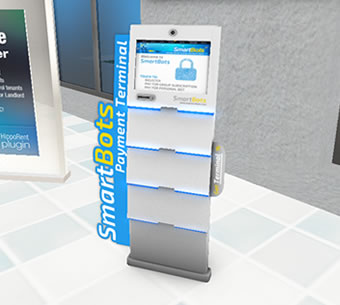
- Click on the "Payments..." button:
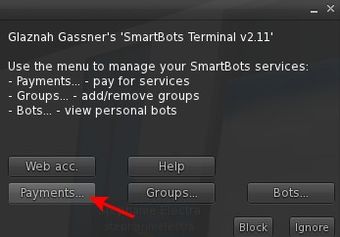
- Click on "Pay Group" button
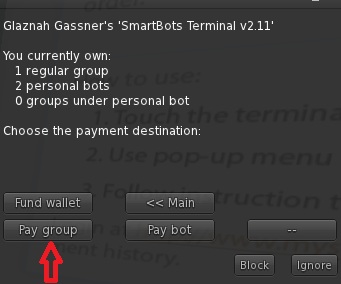
- Select your group from the list and click the appropriate button
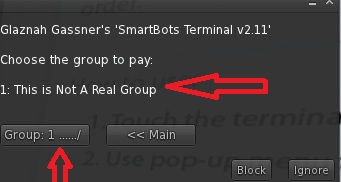
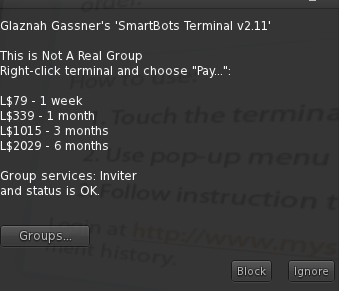
- A pop-up appears showing group name, price to renew the group (varies depending on how many services are active), as well as the current services active on that group and the status of the group:
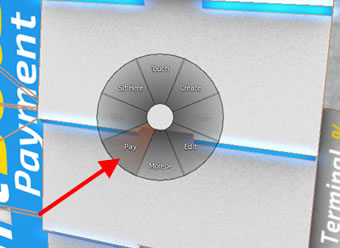
- Right click on the terminal and select pay
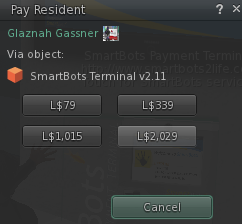
- Pay for the desired amount by clicking on one of the available options:
Troubleshooting
Q: The SL viewer payment window does not contain any numbers!
A: Just repeat the procedure, and payment window will be fixed. This is a bug in the SL Viewer.