
How to pay for Personal Bot
|
|
|||
| (2 intermediate revisions not shown) | |||
| Line 1: | Line 1: | ||
| - | Locate SmartBots terminal. The easiest way is to teleport to [http:// |
+ | Locate SmartBots terminal. The easiest way is to teleport to [http://maps.secondlife.com/secondlife/DuoLife/220/90/32 SmartBots office]. You can also use SmartBots Terminals in partner locations. |
== Instructions == |
== Instructions == |
||
| Line 7: | Line 7: | ||
# Click on the "Pay bot" button: [[Image:Pay for bot 2.jpg|center|border|link=]] |
# Click on the "Pay bot" button: [[Image:Pay for bot 2.jpg|center|border|link=]] |
||
# Choose your bot from the list, and click corresponding button: [[Image:Pay for bot 3.jpg|center|border|link=]] |
# Choose your bot from the list, and click corresponding button: [[Image:Pay for bot 3.jpg|center|border|link=]] |
||
| - | # Short instruction appears. Follow instruction and right-click the terminal: [[Image:Pay for bot 4.jpg|center|border|link=]] [[Image:Pay for bot 5.jpg|center|border|link=]] |
+ | # Short instruction appears. Follow instruction and right-click the terminal: [[Image:Pay for bot 4.jpg|center|border|link=]] |
| + |
# Right click on the terminal and select pay [[Image:Pay for bot 5.jpg|center|border|link=]] |
||
# Pay the desired amount using SL Viewer window: [[Image:Pay for bot 6.jpg|center|border|link=]] |
# Pay the desired amount using SL Viewer window: [[Image:Pay for bot 6.jpg|center|border|link=]] |
||
| Line 21: | Line 22: | ||
'''Q: The SL viewer payment window does not contain any numbers!''' |
'''Q: The SL viewer payment window does not contain any numbers!''' |
||
| - | A: Just repeat the procedure, and payment window will be fixed. This is |
+ | A: Just repeat the procedure, and payment window will be fixed. This is a bug in the SL Viewer. |
[[Category:Existing customers]] |
[[Category:Existing customers]] |
||
__NOTOC__ |
__NOTOC__ |
||
Latest revision as of 18:22, 10 November 2013
Locate SmartBots terminal. The easiest way is to teleport to SmartBots office. You can also use SmartBots Terminals in partner locations.
Instructions
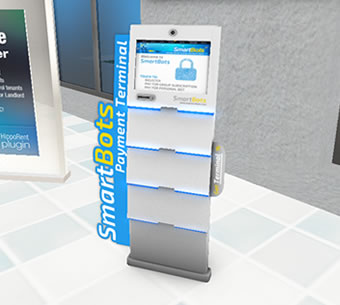
- Touch SmartBots Terminal:
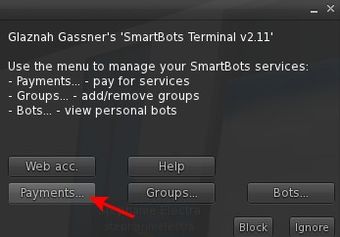
- Click on the "Payments..." button:
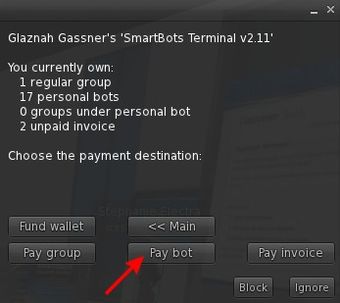
- Click on the "Pay bot" button:
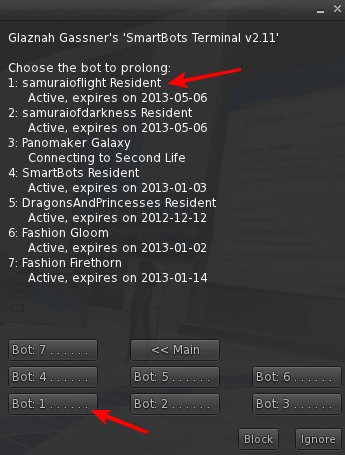
- Choose your bot from the list, and click corresponding button:
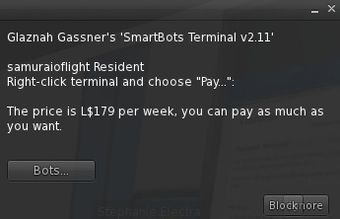
- Short instruction appears. Follow instruction and right-click the terminal:
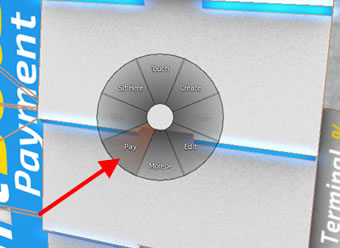
- Right click on the terminal and select pay
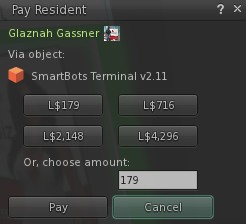
- Pay the desired amount using SL Viewer window:
Note: If you have a lot of personal bots
If you have a lot of personal bots, only 7 bots per page will be displayed:
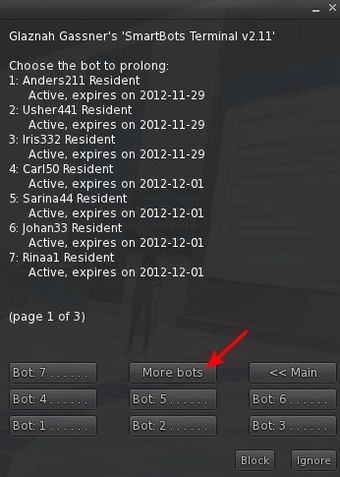
Click on the "More bots" button to list pages and access more of your bots.
Troubleshooting
Q: The SL viewer payment window does not contain any numbers!
A: Just repeat the procedure, and payment window will be fixed. This is a bug in the SL Viewer.