
Group Chat Control Service
| Line 1: | Line 1: | ||
__NOTOC__ |
__NOTOC__ |
||
| - | Group Chat |
+ | Group Chat Service allows you to use group chat without having to log in to Second Life, using the browser.
|
| + | |||
| + |
Group chat can be accessed by both owners of the account and appointed moderators of the group (see below). |
||
| + | |||
| + | |||
== Features == |
== Features == |
||
{{#httpimg: image=http://www.smartbots2life.com/images/service_chat.jpg|class=imageRight}} |
{{#httpimg: image=http://www.smartbots2life.com/images/service_chat.jpg|class=imageRight}} |
||
* '''LISTEN AND TALK''' |
* '''LISTEN AND TALK''' |
||
| - | * Read group chat |
+ | * Read messages in a group chat in real time
|
| - | * Send |
+ | * Send messages to the chat (they go in the name of the bot)
|
* '''EJECT SPAMMERS''' |
* '''EJECT SPAMMERS''' |
||
* Send warnings to particular members |
* Send warnings to particular members |
||
| Line 13: | Line 17: | ||
* Create separate chat moderator accounts |
* Create separate chat moderator accounts |
||
* View moderator's activity |
* View moderator's activity |
||
| + | |||
| + | == Chat Logs == |
||
| + | |||
| + | Group chat displays the same information as the chat in Second Life, but the Group Chat service keeps chat logs for the last 24 hours, even if the owner and all the moderators are offline |
||
| + | |||
| + | |||
| + | The chat logs can be viewed by choosing between the log time as seen below: |
||
| + | |||
| + | [[File:Chat_logs.jpg|center]] |
||
| + | |||
| + | Note you can read the current chat, as well as send messages to the group ( message will be sent on your behalf in the name of the bot) |
||
| + | |||
== Chat control (Antispam) == |
== Chat control (Antispam) == |
||
| Line 21: | Line 37: | ||
== Moderators == |
== Moderators == |
||
| - | You may assign |
+ | You may assign other resdents to moderate your chat. |
| - | '''Moderator''' |
+ | '''Moderator''' accounts have access to the group chat only (it can't edit, create or delete SmartBots groups). However, all moderator's activity is logged, hence you can check your staff activity later. |
[[Chat moderators|Read more]] here about managing moderators accounts. |
[[Chat moderators|Read more]] here about managing moderators accounts. |
||
Revision as of 22:00, 21 May 2012
Group Chat Service allows you to use group chat without having to log in to Second Life, using the browser.
Group chat can be accessed by both owners of the account and appointed moderators of the group (see below).
Features

- LISTEN AND TALK
- Read messages in a group chat in real time
- Send messages to the chat (they go in the name of the bot)
- EJECT SPAMMERS
- Send warnings to particular members
- Eject members from the group.
- MODERATOR ACCOUNTS
- Create separate chat moderator accounts
- View moderator's activity
Chat Logs
Group chat displays the same information as the chat in Second Life, but the Group Chat service keeps chat logs for the last 24 hours, even if the owner and all the moderators are offline
The chat logs can be viewed by choosing between the log time as seen below:

Note you can read the current chat, as well as send messages to the group ( message will be sent on your behalf in the name of the bot)
Chat control (Antispam)
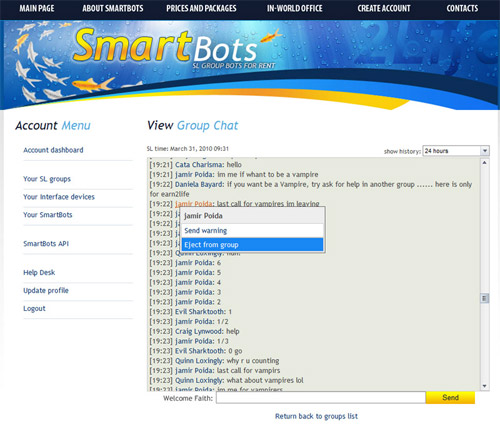
You can warn and eject spammers and abusers from your SL group.
This is easily done by using SmartBots group chat interface:
Moderators
You may assign other resdents to moderate your chat.
Moderator accounts have access to the group chat only (it can't edit, create or delete SmartBots groups). However, all moderator's activity is logged, hence you can check your staff activity later.
Read more here about managing moderators accounts.