
Bot access code
| Line 10: | Line 10: | ||
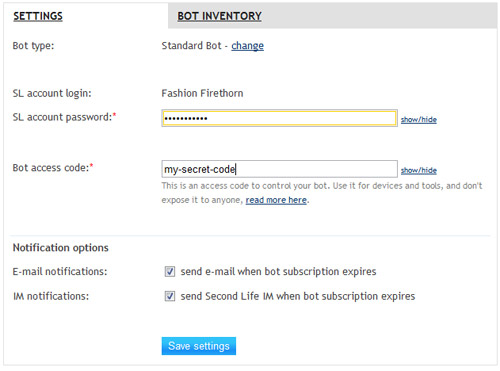
[[Image:Second-life-bot-access-code.jpg|center|link=]] |
[[Image:Second-life-bot-access-code.jpg|center|link=]] |
||
| + | |||
| + | Also you can view and change access code on [http://www.mysmartbots.com/process/bots.html Personal Bot Control Panel]: [[Image:Access code.jpg|center|link=]] |
||
== Usage of Bot Access Code == |
== Usage of Bot Access Code == |
||
Revision as of 08:38, 22 September 2012
Bot Access Code is a kind of password to protect your personal bot from being used by other people.
It works like a Security code for groups, but controls access to your personal bot.
Setting the Bot Access Code
- Login to your account at http://www.smartbots2life.com.
- Locate your personal bot and click the "Settings" link.
- Set the bot access code.

Usage of Bot Access Code
Bot Access Code is required when you use SmartBots API functions and devices to control your personal bot.