
Sim Governor (add-on)
| Line 12: | Line 12: | ||
# To use this module the bot should be added as an estate manager. You add estate managers using you SL viewer. |
# To use this module the bot should be added as an estate manager. You add estate managers using you SL viewer. |
||
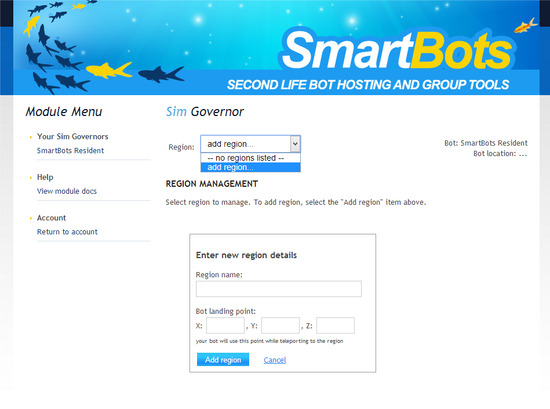
# Open the Sim Governor page, select your bot and add region to manage: [[Image:Sim governor setup.png|link=]] |
# Open the Sim Governor page, select your bot and add region to manage: [[Image:Sim governor setup.png|link=]] |
||
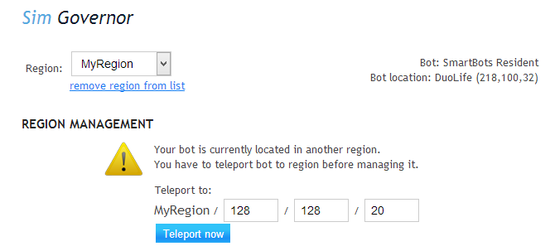
| + | # You may need to teleport your bot to the region: [[Image:Sim governor teleport.png|link=]] |
||
To view the the module page click on “Sim Govenor” from the module list in your account dashboard. |
To view the the module page click on “Sim Govenor” from the module list in your account dashboard. |
||
Revision as of 22:09, 21 September 2014
Sim Governor module allows you to control your sim using your bot without having to login to Second Life.
Features
- Manage Sim access list (ban residents, add them to access list)
- Check the sim ban list for dead accounts
- Eject residents without banning them
- Send a sim wide messages
- Restart the sim
Setup
- To use this module the bot should be added as an estate manager. You add estate managers using you SL viewer.
- Open the Sim Governor page, select your bot and add region to manage:
- You may need to teleport your bot to the region:
To view the the module page click on “Sim Govenor” from the module list in your account dashboard.