
Bot Add-Ons
| Line 19: | Line 19: | ||
A wide variety of additional Modules is available in [https://www.mysmartbots.com/store/ BotStore]: autoresponders, local chat managers, sim management tools. |
A wide variety of additional Modules is available in [https://www.mysmartbots.com/store/ BotStore]: autoresponders, local chat managers, sim management tools. |
||
| - | Check the [[Alive |
+ | Check the [[Alive Bots]] - these are the complicated Modules which turn your bot to an alive avatar (a barkeeper, strip dancer etc). Check the [[Alive Bots|corresponding page]] for more info. |
[https://www.mysmartbots.com/store/ Visit the BotStore] to find more amazing Modules for your bot! |
[https://www.mysmartbots.com/store/ Visit the BotStore] to find more amazing Modules for your bot! |
||
Revision as of 23:06, 21 September 2014
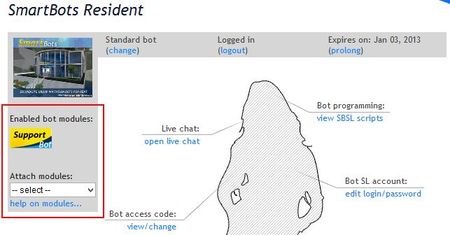
Bot Modules are add-ons for your SmartBots bot. They add various features to your bot and make it interactive and powerful. See the modules list below for details.
Using Modules
To use Modules, you need to purchase a module and attach it to your bot: (illustrated instructions here).
- Open SmartBots Bot Store and locate the module you need.
- Purchase the module using Wallet.
- Attach Module to your bot.
You pay for the module only once. After purchasing the module, you are free to attach it to your bot, and detach when required. However, you need two modules if you want to attach them to two bots at the same time.
Easy 3 days refund is available if you did not like the module.
Existing Modules
A wide variety of additional Modules is available in BotStore: autoresponders, local chat managers, sim management tools.
Check the Alive Bots - these are the complicated Modules which turn your bot to an alive avatar (a barkeeper, strip dancer etc). Check the corresponding page for more info.
Visit the BotStore to find more amazing Modules for your bot!