
Groups larger than 5000 members
|
m (→Second Life viewer)
|
m (→Assigning the ability)
|
||
| Line 17: | Line 17: | ||
=== Firestorm viewer === |
=== Firestorm viewer === |
||
| - | # Open up the group's profile page [[Image:Firestorm_5000Members_1.jpg|center|border|link=]] |
+ | # Open up the group's profile page. [[Image:Firestorm_5000Members_1.jpg|center|border|link=]] |
| - | # Navigate to the '''Members & Roles''' tab and give the bot's role the ability to '''Eject members from this group''' and also '''Assign Members to Assigner's Roles''' [[Image:Firestorm_5000Members_2.jpg|center|border|link=]] |
+ | # Navigate to the '''Members & Roles''' tab and give the bot's role the ability to '''Eject members from this group''' and also '''Assign Members to Assigner's Roles'''. [[Image:Firestorm_5000Members_2.jpg|center|border|link=]] |
# Save changes and your bot can now see all group members! |
# Save changes and your bot can now see all group members! |
||
=== Second Life viewer === |
=== Second Life viewer === |
||
| - | # Open up the group's profile page [[Image:SL_5000Members_1.jpg|center|border|link=]] |
+ | # Open up the group's profile page. [[Image:SL_5000Members_1.jpg|center|border|link=]] |
| - | # Navigate to the '''Roles & Members''' tab and give the bot's role the ability to '''Eject members from this group'''[[Image:SL_5000Members_2.jpg|center|border|link=]] |
+ | # Navigate to the '''Roles & Members''' tab and give the bot's role the ability to '''Eject members from this group'''.[[Image:SL_5000Members_2.jpg|center|border|link=]] |
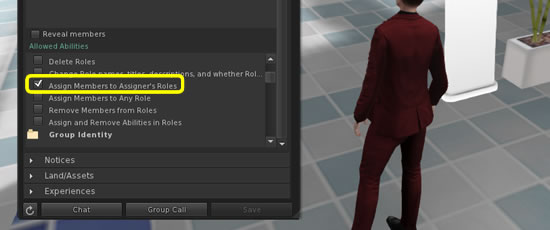
| - | # Also, give the bot's role the ability to '''Assign Members to Assigner's Roles'''[[Image:SL_5000Members_3.jpg|center|border|link=]] |
+ | # Also, give the bot's role the ability to '''Assign Members to Assigner's Roles'''.[[Image:SL_5000Members_3.jpg|center|border|link=]] |
# Save changes and your bot can now see all group members! |
# Save changes and your bot can now see all group members! |
||
Revision as of 11:08, 3 July 2015
Since Jun 2015 there's a change loading large groups (more than 5000 members). By default, regular group members can't load the large group list.
To completely load such group one of the following abilities is required:
- Eject Members from this Group
- Assign Members to Assigner's Roles
Since your bot requires to see the whole group, we will remind you to turn on one of these abilities:
<<Dashboard image goes here>>
If you see this warning, and the number of members in your group is not updating, it is time to assign the ability to the bot.
Assigning the ability
Firestorm viewer
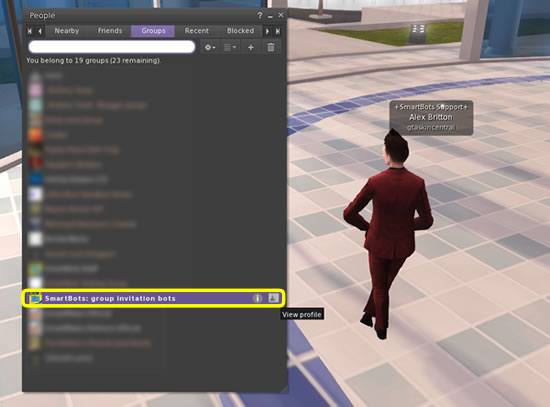
- Open up the group's profile page.
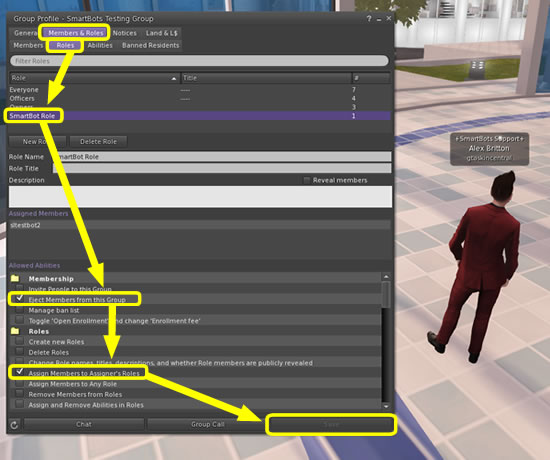
- Navigate to the Members & Roles tab and give the bot's role the ability to Eject members from this group and also Assign Members to Assigner's Roles.
- Save changes and your bot can now see all group members!
Second Life viewer
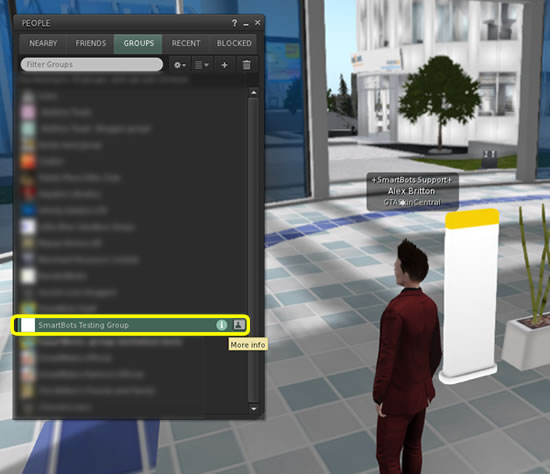
- Open up the group's profile page.
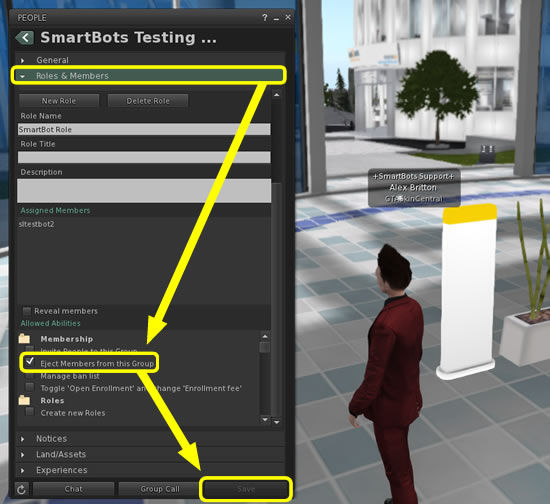
- Navigate to the Roles & Members tab and give the bot's role the ability to Eject members from this group.
- Also, give the bot's role the ability to Assign Members to Assigner's Roles.
- Save changes and your bot can now see all group members!