
Immortal Bot (add-on)
| Line 8: | Line 8: | ||
# Purchase the module in Bot Store (view instructions [[Purchasing Module|here]]). |
# Purchase the module in Bot Store (view instructions [[Purchasing Module|here]]). |
||
# Assign the module to your bot (use [[Personal Bot Control Panel]]): [[Image:Purchase immortal 3.jpg|link=|center|border]] |
# Assign the module to your bot (use [[Personal Bot Control Panel]]): [[Image:Purchase immortal 3.jpg|link=|center|border]] |
||
| - | # Enjoy your |
+ | # Enjoy your never-expiring bot! |
== Additional information == |
== Additional information == |
||
Revision as of 17:24, 25 December 2015
"Immortal Bot" module makes your bot never-expiring. When enabled, this module shifts the expiration date to the future, thus your bot will never expire.
If you have several Bots, you can purchase several Immortal Bot modules and assign one to each respective bot.
How to purchase
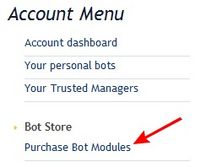
- Open SmartBots Bot Store:
- Purchase the module in Bot Store (view instructions here).
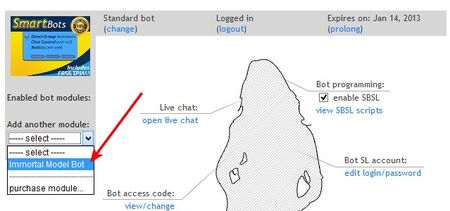
- Assign the module to your bot (use Personal Bot Control Panel):
- Enjoy your never-expiring bot!
Additional information
- There are two different modules: one for Model bots, and one for Standard bots (latter may not be available for purchase)
- You can disable the module for one bot and enable it on another. The "Immortal" status will be moved to the new bot.
- The bot has to be active before applying the module. Thus, you need to make at lease one regular subscription payment to launch your bot.
- You can refund your module purchase within 3 days.