Waypoint Helper
|
QuincyJohnes (Talk | contribs)
(→General Information & Usage)
|
QuincyJohnes (Talk | contribs)
(→General Information & Usage)
|
||
| Line 8: | Line 8: | ||
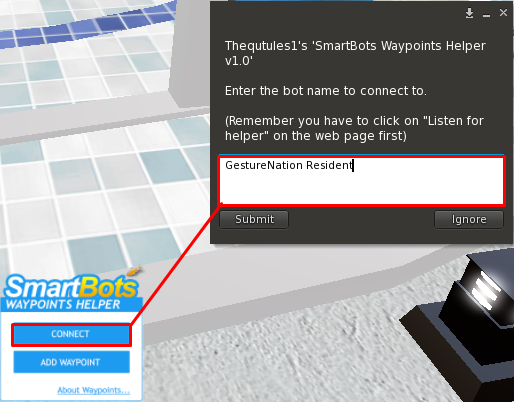
# Click "Connect"on your device in-order to synchronize it with your bot and enter your bot's SL name in the pop-up box [[Image:Helper 2.png|link=|center|border|400px]] |
# Click "Connect"on your device in-order to synchronize it with your bot and enter your bot's SL name in the pop-up box [[Image:Helper 2.png|link=|center|border|400px]] |
||
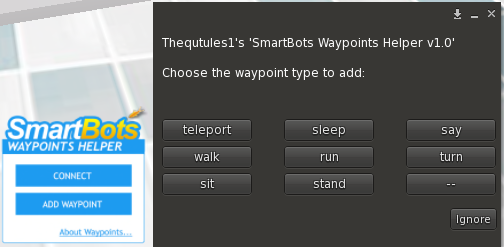
# That's it! Now you can go ahead and click "Add waypoint" on your helper device, in-order to quickly insert the waypoint command(s) of your wish. [[Image:Helper 4.png|link=|center|border|400px]] |
# That's it! Now you can go ahead and click "Add waypoint" on your helper device, in-order to quickly insert the waypoint command(s) of your wish. [[Image:Helper 4.png|link=|center|border|400px]] |
||
| + | |||
| + | __NOTOC__ |
||
Revision as of 11:42, 22 August 2016
General Information & Usage
SmartBots WayPoint Helper is a small device to help you configure your WayPoints Navigation module faster and quickly through Second Life.
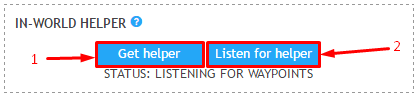
- In-order to receive your helper device, please click on "get helper" in your configuration page of WayPoints module - accept the item in-world and wear it.
- Return to your configuration page, and click on "Listen for helper"
- Click "Connect"on your device in-order to synchronize it with your bot and enter your bot's SL name in the pop-up box
- That's it! Now you can go ahead and click "Add waypoint" on your helper device, in-order to quickly insert the waypoint command(s) of your wish.