
Waypoints Navigation
|
QuincyJohnes (Talk | contribs)
(→Configuration & Help)
|
QuincyJohnes (Talk | contribs)
|
||
| Line 1: | Line 1: | ||
| - | The Waypoints |
+ | The Waypoints Navigation module can turn your [[Personal Bot]] into a 24/7 automatic walking tour-guide for your land and it's visitors with abilities to await for special command, sit & stand, walk, run, talk, use animations and sounds as it goes and much, much more! |
| - | - |
+ |
If you have a huge, or even small, land in Second Life that would require someone to explain what it's about tirelessly just by sending it an IM (Or even automatically, without any stops) - the following module is your choice!
|
| - | = |
+ |
[[Image:WayPoints.png|link=|center|border|550px]]
|
| - | + | == Overview == |
|
| - | + | ||
| - | + | ||
| - | + | ||
| - | + | * You configure your simple tour with several waypoints, or a very complex one with multiple advanced commands! |
|
| + | * Your bot starts executing your indicated commands within your configuration |
||
| - | == |
+ | == How to Activate & Use == |
| - | + |
=== Step 1. Purchase the module ===
|
|
| - | + |
# You can [https://www.mysmartbots.com/store/item/38/waypoints_navigator/ Purchase it from the bot store.] |
|
| - | + |
#Attach it to you bot. (Works with both [https://www.mysmartbots.com/docs/Type_of_Personal_Bots Personal Bot Types])
|
|
| + | === Step 2. Configure it! === |
||
| + | |||
| + | # You can visit [[Setting up waypoints]] page in-order to start configuring your module. |
||
| + | # The commands of WayPoints Navigation module is being constantly updated, please visit [[Waypoint_Navigation_Commands]] web-page in-order to find out more. |
||
| + | |||
| + | === Step 3. Use it! === |
||
| + | |||
| + | * You can also use the [http://docs.mysmartbots.com/docs/Waypoint_Helper#General_Information_.26_Usage in-world helper device], to quickly bring some changes to your current configuration of module, too! |
||
| + | |||
| + | ---- |
||
== Troubleshooting and known issues == |
== Troubleshooting and known issues == |
||
;'''My bot stops before reaching the waypoint and skips to the next one.''' |
;'''My bot stops before reaching the waypoint and skips to the next one.''' |
||
Revision as of 21:39, 22 August 2016
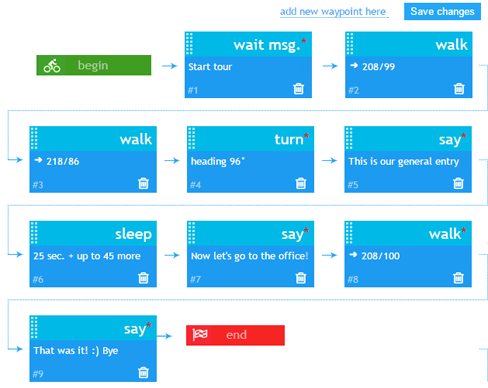
The Waypoints Navigation module can turn your Personal Bot into a 24/7 automatic walking tour-guide for your land and it's visitors with abilities to await for special command, sit & stand, walk, run, talk, use animations and sounds as it goes and much, much more!
If you have a huge, or even small, land in Second Life that would require someone to explain what it's about tirelessly just by sending it an IM (Or even automatically, without any stops) - the following module is your choice!
Overview
- You configure your simple tour with several waypoints, or a very complex one with multiple advanced commands!
- Your bot starts executing your indicated commands within your configuration
How to Activate & Use
Step 1. Purchase the module
- You can Purchase it from the bot store.
- Attach it to you bot. (Works with both Personal Bot Types)
Step 2. Configure it!
- You can visit Setting up waypoints page in-order to start configuring your module.
- The commands of WayPoints Navigation module is being constantly updated, please visit Waypoint_Navigation_Commands web-page in-order to find out more.
Step 3. Use it!
- You can also use the in-world helper device, to quickly bring some changes to your current configuration of module, too!
Troubleshooting and known issues
- My bot stops before reaching the waypoint and skips to the next one.
- It's possible that your bot is hitting something and getting stuck on the way to the waypoint.
- The bot doesn't move once saving changes?
- This is a know bug we are working to resolve. Please contact us using the live chat to find out the reason.
- Something else wrong?
- Contact our live chat or in-world support for more help!