
Waypoints Navigation
| Line 32: | Line 32: | ||
[[Image:Waypoints tools.png|center|link=]] |
[[Image:Waypoints tools.png|center|link=]] |
||
| + | |||
| + | == What's next? == |
||
| + | |||
| + | Visit [https://www.mysmartbots.com/store/item/38/waypoints_navigator/ Waypoints Store page] now and try it. Remember you can refund any purchased module if you don't like it! |
||
---- |
---- |
||
Revision as of 20:19, 2 September 2016
The Waypoints Navigation module turns your Personal Bot into a 24/7 automatic walking tour-guide for your land with ability sit & stand, walk, run, talk, use animations and sounds as it goes and much, much more!
If you have a small or huge piece of Second Life land that requires someone to explain what it's about tirelessly just by sending it an IM (Or even automatically, without any stops) - the following module is your choice!
Editor
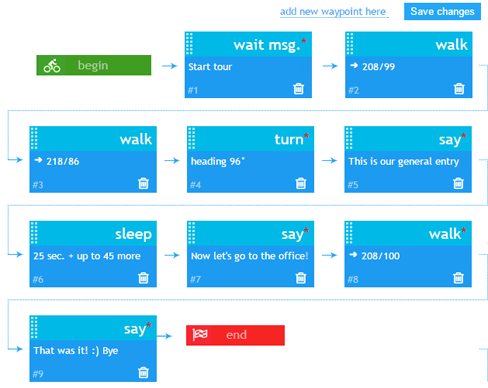
Waypoints editor is simple, commands can be added, moved and deleted easily:
Overview
- Configure a simple tour with several waypoints, or a complex path with multiple commands
- Bot starts executing your commands
Activation & Use
Step 1. Purchase the module
- Purchase module from the bot Store.
- Attach module to you bot (module works with both Standard and Model bots)
Step 2. Configure it!
- Read Setting up waypoints page in-order to start configuring your module.
- Check the list of Waypoints command to learn more about available commands.
- You can also use the Waypoint_Helper device to quickly add points to your list
Step 3. Use it!
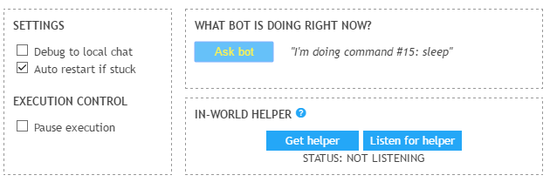
Bot stars completing your commands immediately after you save them. You can pause execution and even turn on diagnostic messages to know what your bot is doing now.
What's next?
Visit Waypoints Store page now and try it. Remember you can refund any purchased module if you don't like it!
Troubleshooting and known issues
- My bot stops before reaching the waypoint and skips to the next one.
- It's possible that your bot is hitting something and getting stuck on the way to the waypoint.
- The bot doesn't move once saving changes?
- This is a know bug we are working to resolve. Please contact us using the live chat to find out the reason.
- Something else wrong?
- Contact our live chat or in-world support for more help!