
Waypoints Navigation
|
QuincyJohnes (Talk | contribs)
|
|||
| Line 1: | Line 1: | ||
| - | |||
| - | |||
The Waypoints Navigation module turns your [[Personal Bot]] into a 24/7 automatic walking tour-guide for your land with ability sit & stand, walk, run, talk, use animations and sounds as it goes and much, much more! |
The Waypoints Navigation module turns your [[Personal Bot]] into a 24/7 automatic walking tour-guide for your land with ability sit & stand, walk, run, talk, use animations and sounds as it goes and much, much more! |
||
Revision as of 09:59, 23 September 2016
The Waypoints Navigation module turns your Personal Bot into a 24/7 automatic walking tour-guide for your land with ability sit & stand, walk, run, talk, use animations and sounds as it goes and much, much more!
If you have a land that requires automatic tour-guides, this module is for you. Read below to know more about some cool features it offers!
Editor
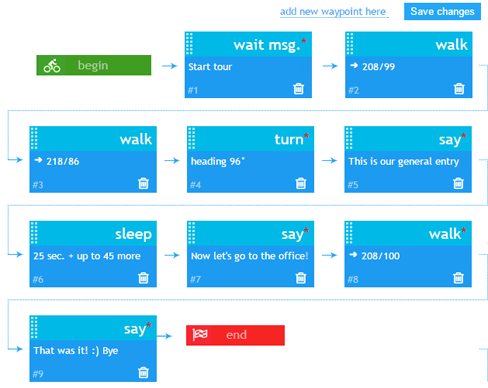
Waypoints editor is simple, commands can be added, moved and deleted easily:
Overview
- Configure a simple tour with several waypoints, or a complex path with multiple commands
- Bot starts executing your commands
Activation & Use
Step 1. Purchase the module
- Purchase module from the bot Store.
- Attach module to you bot (module works with both Standard and Model bots)
Step 2. Configure it!
- Read Setting up waypoints page in-order to start configuring your module.
- Check the list of Waypoints command to learn more about available commands.
- You can also use the Waypoint_Helper device to quickly add points to your list
Step 3. Use it!
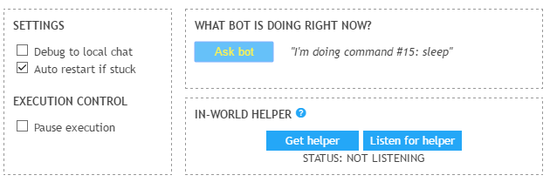
Bot stars completing your commands immediately after you save them. You can pause execution and even turn on diagnostic messages to know what your bot is doing now.
What's next?
Visit Waypoints Store page now and try it. Remember you can refund any purchased module if you don't like it!