
Bot Pose Stand
|
QuincyJohnes (Talk | contribs)
|
|||
| (3 intermediate revisions not shown) | |||
| Line 1: | Line 1: | ||
| - | Bot pose stand is a simple but useful device used to put your bot on a specific position and animate it. When the bot is on the pose stand no avatar will be able to push it. |
+ |
The Bot pose stand is a simple but useful device used to put your bot on a specific position and animate it. When the bot is on the pose stand no avatar will be able to push it. |
After placing the pose stand it is necessary to put an animation that you want to the bot to play or it will use the default animation found in the pose stand. |
After placing the pose stand it is necessary to put an animation that you want to the bot to play or it will use the default animation found in the pose stand. |
||
| Line 6: | Line 6: | ||
[[Image:Pose-stand-view.jpg|center|link=|border]] |
[[Image:Pose-stand-view.jpg|center|link=|border]] |
||
| - | When the bot is instructed to sit on the stand it becomes invisible. |
+ | When the bot is instructed to sit on the stand it becomes invisible. The stand is controllable using simple pop-up menu. When you click on the stand a menu with the following options appear: |
| + | |||
| + | [[Image:PoseStandMenu.png|center|link=|border]] |
||
| + | |||
| + | *Adjust Z+ - Increases floating height of the bot (moves it higher in the air). |
||
| + | |||
| + | *Adjust Z- - Decreases the floating height of the bot (brings it closer to the ground) |
||
*Set Anim - choose the active animation for the bot, or indicate that the bot needs to randomly change the animation. |
*Set Anim - choose the active animation for the bot, or indicate that the bot needs to randomly change the animation. |
||
| Line 16: | Line 22: | ||
To to make the bot sit on the stand you must use the Personal Bot HUD and use the Control => Sit button. |
To to make the bot sit on the stand you must use the Personal Bot HUD and use the Control => Sit button. |
||
| - | + | == How to Get Pose Stand == |
|
| + | |||
| + |
You can obtain a pose stand for free by either [https://www.mysmartbots.com/process/personal.html?action=tools clicking get bot control tools] in your account dashboard or visiting our inworld store. |
||
[[Category: Personal bots]] |
[[Category: Personal bots]] |
||
Latest revision as of 08:40, 9 June 2017
The Bot pose stand is a simple but useful device used to put your bot on a specific position and animate it. When the bot is on the pose stand no avatar will be able to push it.
After placing the pose stand it is necessary to put an animation that you want to the bot to play or it will use the default animation found in the pose stand.
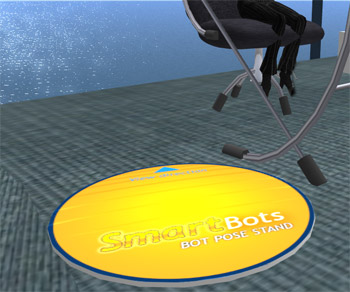
When the bot is instructed to sit on the stand it becomes invisible. The stand is controllable using simple pop-up menu. When you click on the stand a menu with the following options appear:
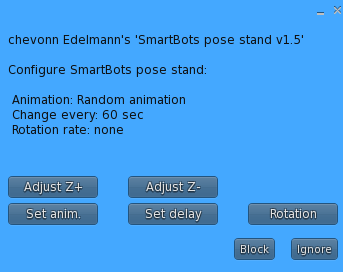
- Adjust Z+ - Increases floating height of the bot (moves it higher in the air).
- Adjust Z- - Decreases the floating height of the bot (brings it closer to the ground)
- Set Anim - choose the active animation for the bot, or indicate that the bot needs to randomly change the animation.
- Set delay - delay between changing the active animation.
- Rotation - set rotation speed of the stand.
To to make the bot sit on the stand you must use the Personal Bot HUD and use the Control => Sit button.
How to Get Pose Stand
You can obtain a pose stand for free by either clicking get bot control tools in your account dashboard or visiting our inworld store.