
Trusted Managers
| Line 72: | Line 72: | ||
Your managers are also able to control your [http://www.mysmartbots.com/docs/Bot_Add-Ons bot add-ons] (The add-ons of your bots) you can allow your managers to gain access over your add-ons by navigating to your Trusted Managers section in your account and upon creating or modifying the access of manager - Click on "Allow add-ons" |
Your managers are also able to control your [http://www.mysmartbots.com/docs/Bot_Add-Ons bot add-ons] (The add-ons of your bots) you can allow your managers to gain access over your add-ons by navigating to your Trusted Managers section in your account and upon creating or modifying the access of manager - Click on "Allow add-ons" |
||
| - | Currently, there are the following |
+ | Currently, there are the following add-ons available for Trusted Managers to control: |
# [http://www.mysmartbots.com/docs/Alive_Support_Bot Alive Support Bot] |
# [http://www.mysmartbots.com/docs/Alive_Support_Bot Alive Support Bot] |
||
# [http://www.mysmartbots.com/docs/Bot_Local_Chat_(Add-On) Bot Local Chat] |
# [http://www.mysmartbots.com/docs/Bot_Local_Chat_(Add-On) Bot Local Chat] |
||
Revision as of 18:21, 22 June 2017
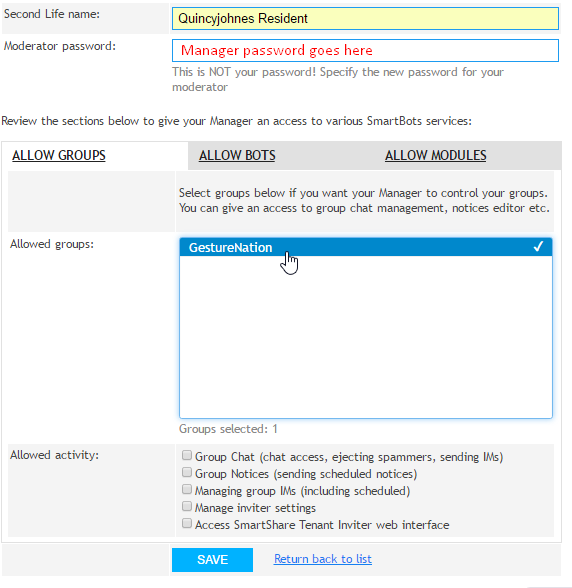
Sometimes it might be necessary to allow someone to manage your groups and/or bot. This might be a colleague, employee or friend. Therefore the "Trusted Managers" section has been provided to grant management permissions to other residents.
Your "Trusted Manager" can have access to your groups and/or bots (read the instructions below to know more).
Manager abilities
You can assign any set of abilities to each of your manager:
| Service | Manager abilities |
|---|---|
| Group Inviter |
You specify the groups available to each manager. |
| Group Chat |
You specify the groups available to each manager. |
| Group Notices |
You specify the groups available to each manager. |
| Personal bots |
You specify the bots each manager can control. |
| Bot add-ons | * Access your add-ons (see Bot Store).
You specify which add-ons are available for manager |
Adding and changing managers
Accessing manager account
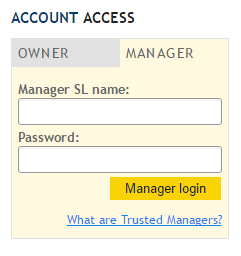
Trusted Managers can access their accounts from main web-page with the login and password created and given by account owner. (Account owners can also change/modify managers passwords at anytime)
Accessing bot add-ons
Your managers are also able to control your bot add-ons (The add-ons of your bots) you can allow your managers to gain access over your add-ons by navigating to your Trusted Managers section in your account and upon creating or modifying the access of manager - Click on "Allow add-ons"
Currently, there are the following add-ons available for Trusted Managers to control: