
Waypoints Navigation
|
m
|
QuincyJohnes (Talk | contribs)
|
||
| (31 intermediate revisions not shown) | |||
| Line 1: | Line 1: | ||
| - | + | {{Bot addon| |
|
| + | store_id=38| |
||
| + |
menu_text=Waypoints Navigator|
|
||
| + | docs=Setting up waypoints| |
||
| + | }} |
||
| - | |||
| - | + | The Waypoints Navigation add-on turns your [[Personal Bots]] into a 24/7 automatic walking tour-guide for your land with ability sit & stand, walk, run, talk, use animations and sounds as it goes and much, much more! |
|
| - | + |
If you have a land that requires automatic tour-guides, this add-on is for you. Read below to know more about some cool features it offers! |
|
| - | + | ||
| - | + | ||
| - | + | ||
| - | + | <videoflash>hZizi9DgFAw|624|351</videoflash> |
|
| - | == |
+ | == Graphical Editor == |
| - | + |
Waypoints editor is simple, commands can be added, moved and deleted easily: |
|
| - | + | ||
| - | + | ||
| - | + | ||
| - | + | ||
| - | + | ||
| - | + | ||
| - | + | [[Image:WayPoints.png|link=|center|border]] |
|
| - | == |
+ | == Usage == |
| - | + | ||
| - | : |
+ |
# [https://www.mysmartbots.com/store/item/38/waypoints_navigator/ Purchase add-on from the bot Store.]
|
| - | + |
# Attach add-on to you bot (add-on works with both [https://www.mysmartbots.com/docs/Type_of_Personal_Bots Standard and Model bots])
|
|
| - | + |
# Add waypoints: read [[Setting up waypoints|this page]] for details.
|
|
| - | + | ||
| - | : |
+ |
== Read more ==
|
| + | |||
| + | Check the [[Waypoint_Navigation_Commands|Waypoint commands]] page for commands available. |
||
[[Category: Personal bots]] |
[[Category: Personal bots]] |
||
| - | [[Category:Bot |
+ | [[Category:Bot add-ons]] |
__NOTOC__ |
__NOTOC__ |
||
Latest revision as of 16:12, 23 June 2017
This is a bot add-on:
1. Get this addon:
- Buy in web Bot Store
- Then attach to your bot
2. Configure in left menu:

Waypoints Navigator
The Waypoints Navigation add-on turns your Personal Bots into a 24/7 automatic walking tour-guide for your land with ability sit & stand, walk, run, talk, use animations and sounds as it goes and much, much more!
If you have a land that requires automatic tour-guides, this add-on is for you. Read below to know more about some cool features it offers!
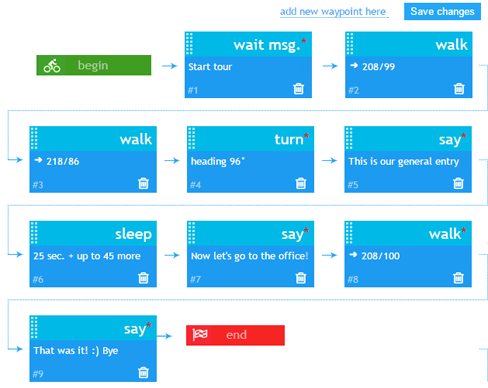
Graphical Editor
Waypoints editor is simple, commands can be added, moved and deleted easily:
Usage
- Purchase add-on from the bot Store.
- Attach add-on to you bot (add-on works with both Standard and Model bots)
- Add waypoints: read this page for details.
Read more
Check the Waypoint commands page for commands available.