
Group Notices Service
|
QuincyJohnes (Talk | contribs)
|
|||
| (13 intermediate revisions not shown) | |||
| Line 1: | Line 1: | ||
| - | + | == General Information == |
|
| - | + | ||
| - | + |
Group Notices Service is designed to send out notices to a group consisting of a header, text, and optional attachments.
|
|
| - | + | ||
| - | + | ||
| - | + | ||
| - | + | ||
| - | + |
The notice is set up using a web interface: |
|
| - | + | ||
| - | = |
+ |
[[File:Group_Notices2.png|center|link=]]
|
| - | + | ||
| - | + | ||
| - | + | ||
| - | + | == Periodic & One-Time Notices == |
|
| - | + |
There are two types of notices you can send using your Group Notices Service: Periodic and One-Time Notices. Both types can have inventory items attached to them (landmark, notecard or any other SL item). |
|
| - | One- |
+ | |
| - | === |
+ | === One-Time Notices === |
| - | + | ||
| - | + | ||
| - | + | ||
| - | + | ||
| - | + | These notices are sent out one time (either immediately or according to your desired schedule). |
|
| + | |||
| + |
[[File:Periodic_Notice_renewed_pic_2.png|center|link=]]
|
||
| + | |||
| + | === Periodic Notices === |
||
| + | |||
| + | These notices are different in that they are sent one or more times according to the schedule you set up. This can be done once an hour, or on any given day of the week or month. |
||
| + | |||
| + | == How to set up == |
||
| + | |||
| + | Setting up notices is quick and simple. |
||
| + | |||
| + |
# Add a group to your account: [[How_to_Add_a_group|click here for instructions]] |
||
| + |
# Assign your bot with abilities: [[Setting_up_bot_for_sending_notices|click here for instructions]]
|
||
| + |
# Start creating your notices: [[Setting_up_notices|click here for instructions]] |
||
| + | |||
| + | __NOTOC__ |
||
[[Category: Group Notices Service]] |
[[Category: Group Notices Service]] |
||
Latest revision as of 14:46, 17 July 2017
General Information
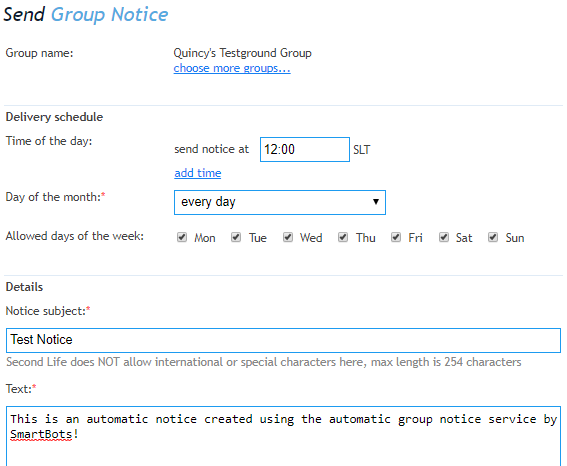
Group Notices Service is designed to send out notices to a group consisting of a header, text, and optional attachments.
The notice is set up using a web interface:
Periodic & One-Time Notices
There are two types of notices you can send using your Group Notices Service: Periodic and One-Time Notices. Both types can have inventory items attached to them (landmark, notecard or any other SL item).
One-Time Notices
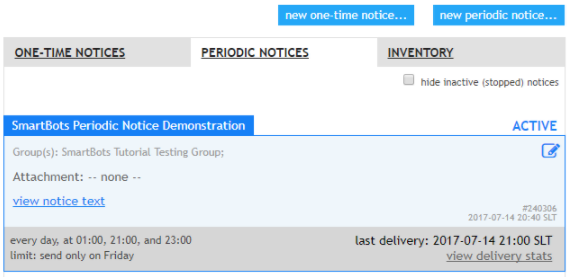
These notices are sent out one time (either immediately or according to your desired schedule).
Periodic Notices
These notices are different in that they are sent one or more times according to the schedule you set up. This can be done once an hour, or on any given day of the week or month.
How to set up
Setting up notices is quick and simple.
- Add a group to your account: click here for instructions
- Assign your bot with abilities: click here for instructions
- Start creating your notices: click here for instructions