
Blacklist
|
QuincyJohnes (Talk | contribs)
|
|||
| (8 intermediate revisions not shown) | |||
| Line 1: | Line 1: | ||
| - | + |
The Blacklist is a list of avatars for your group which should never get an invitation to the group. For example, it can automatically eject a spammer. |
|
| - | == |
+ | == Managing Blacklist == |
| - | + | ||
| - | + | On the management page of blacklisted of avatars, you can add them to the list, or delete them from it. |
|
| + |
In addition, You can put a check box "Use one the same blacklist for all my groups", then the same black list will be used for all your groups. |
||
| + | |||
| + |
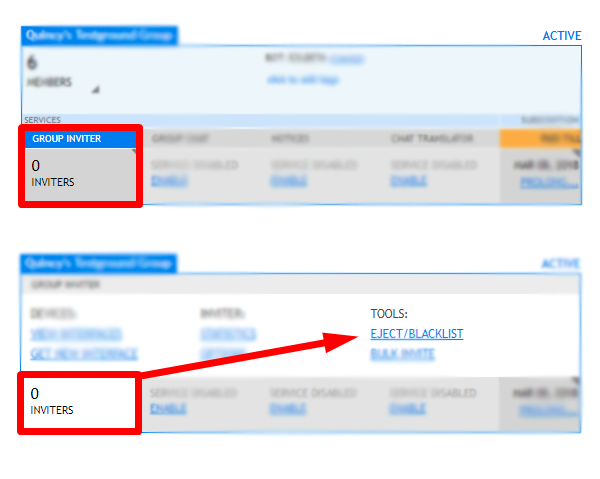
To Add a name to the blacklist locate the desired group, hover over the inviter option and select 'blacklist'.
|
||
| + | |||
| + | |||
| + | [[File:Blacklist_v3.png|center|link=|border]] |
||
| + | |||
| + |
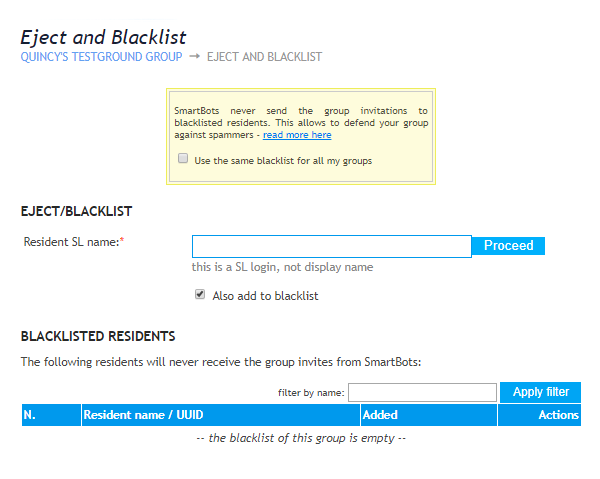
Then type in the name of the person and click proceed.
|
||
| + | |||
| + |
[[File:Blacklist_v4.png|center|link=|border]]
|
||
== Protecting your group against spammers == |
== Protecting your group against spammers == |
||
| - | The most powerful measure |
+ | The most powerful measure against a spammer is to eject him from the group. However, if your group has open enrollment, the abuser will be able to join again in a minute. |
| - | To protect your group chat, close the group enrollment and invite new members |
+ | To protect your group chat, close the group enrollment and invite new members using only SmartBot Interfaces. |
| - | + |
If you eject a spammer and add him to the blacklist he wont be able to join again. |
|
== Blacklisting automatically == |
== Blacklisting automatically == |
||
| - | Adding residents manually may be |
+ | Adding residents manually may be to time consuming. To blacklist and eject abusers with one click use the [[Group Chat Control Service]]. |
[[Category: Existing customers]] |
[[Category: Existing customers]] |
||
[[Category: Group Inviter Service]] |
[[Category: Group Inviter Service]] |
||
| + | |||
| + | |||
| + | __NOTOC__ |
||
Latest revision as of 15:19, 14 February 2018
The Blacklist is a list of avatars for your group which should never get an invitation to the group. For example, it can automatically eject a spammer.
Managing Blacklist
On the management page of blacklisted of avatars, you can add them to the list, or delete them from it. In addition, You can put a check box "Use one the same blacklist for all my groups", then the same black list will be used for all your groups.
To Add a name to the blacklist locate the desired group, hover over the inviter option and select 'blacklist'.
Then type in the name of the person and click proceed.
Protecting your group against spammers
The most powerful measure against a spammer is to eject him from the group. However, if your group has open enrollment, the abuser will be able to join again in a minute.
To protect your group chat, close the group enrollment and invite new members using only SmartBot Interfaces.
If you eject a spammer and add him to the blacklist he wont be able to join again.
Blacklisting automatically
Adding residents manually may be to time consuming. To blacklist and eject abusers with one click use the Group Chat Control Service.