
Bot Add-Ons
|
QuincyJohnes (Talk | contribs)
|
|||
| (4 intermediate revisions not shown) | |||
| Line 1: | Line 1: | ||
| - | Bot |
+ | Bot Add-Ons are add-ons for your SmartBots bot. They add various features to your bot and make it interactive and powerful. See the add-ons list below for details. |
| - | [[Image: |
+ | [[Image:Bot_addons.png|link=|center|border]] |
| - | == Using |
+ | == Using Add-Ons == |
| - | To use |
+ | To use Add-Ons, you need to purchase an add-on and attach it to your bot: ([[Purchasing Module|illustrated instructions here]]). |
| - | # Open SmartBots Bot Store and locate the |
+ | # Open SmartBots Bot Store and locate the add-on you need. |
| - | # Purchase the |
+ | # Purchase the add-on using [[Wallet]]. |
| - | # Attach |
+ | # Attach Add-On to your bot. |
| - | You pay for the |
+ | You pay for the add-on only once. After purchasing the add-on, you are free to attach it to your bot, and detach when required. |
| - | + |
You purchase one add-on per bot, so if you would like two bots to have the same add-on, you will have to purchase the add-on twice. |
|
| - | + | Easy 3 days refund is available if you did not like the add-on. |
|
| - | + | == Existing Add-Ons == |
|
| - | + |
A wide variety of additional Add-Ons is available in [https://www.mysmartbots.com/store/ BotStore]: autoresponders, local chat managers, sim management tools. |
|
| - | [https://www.mysmartbots.com/store/ Visit the BotStore] to find more amazing |
+ | Check the [[Alive Bots]] - these are the complicated Add-Ons which turn your bot to an alive avatar (a barkeeper, strip dancer etc). Check the [[Alive Bots|corresponding page]] for more info. |
| + | |||
| + | [https://www.mysmartbots.com/store/ Visit the BotStore] to find more amazing Add-Ons for your bot! |
||
[[Category: Personal bots]] |
[[Category: Personal bots]] |
||
| - | [[Category:Bot |
+ | [[Category:Bot add-ons]] |
__NOTOC__ |
__NOTOC__ |
||
Latest revision as of 21:10, 18 January 2019
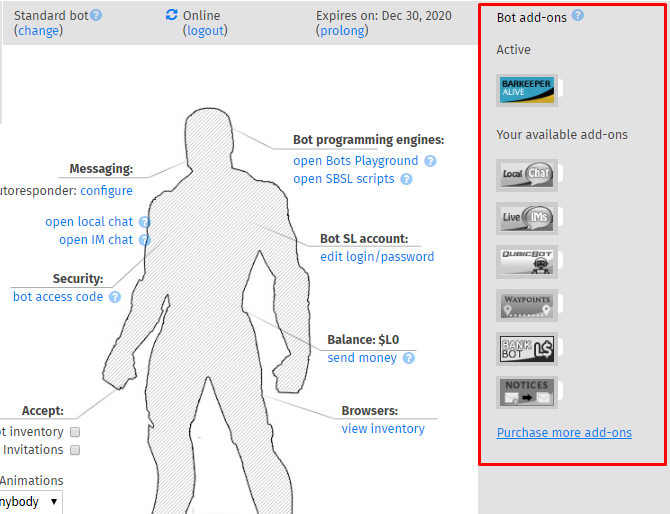
Bot Add-Ons are add-ons for your SmartBots bot. They add various features to your bot and make it interactive and powerful. See the add-ons list below for details.
Using Add-Ons
To use Add-Ons, you need to purchase an add-on and attach it to your bot: (illustrated instructions here).
- Open SmartBots Bot Store and locate the add-on you need.
- Purchase the add-on using Wallet.
- Attach Add-On to your bot.
You pay for the add-on only once. After purchasing the add-on, you are free to attach it to your bot, and detach when required.
You purchase one add-on per bot, so if you would like two bots to have the same add-on, you will have to purchase the add-on twice.
Easy 3 days refund is available if you did not like the add-on.
Existing Add-Ons
A wide variety of additional Add-Ons is available in BotStore: autoresponders, local chat managers, sim management tools.
Check the Alive Bots - these are the complicated Add-Ons which turn your bot to an alive avatar (a barkeeper, strip dancer etc). Check the corresponding page for more info.
Visit the BotStore to find more amazing Add-Ons for your bot!