
LocalChat Autoresponder (add-on)
| Line 57: | Line 57: | ||
=== 2. Multiple variants with a default reply === |
=== 2. Multiple variants with a default reply === |
||
| + | |||
| + | This ruleset allows setting up various replies to various local chat messages (as much as you need): |
||
'''Rule 1'''<br> |
'''Rule 1'''<br> |
||
| Line 77: | Line 79: | ||
=== 3. Matching several rules === |
=== 3. Matching several rules === |
||
| + | |||
| + | This ruleset shows how multiple rules can match one message (saying "hi" or "hello" and then "Welcome") |
||
'''Rule 1'''<br> |
'''Rule 1'''<br> |
||
Match: ''hi''<br> |
Match: ''hi''<br> |
||
| - | Say to chat: '' |
+ | Say to chat: ''Hi there %FIRST_NAME%!''<br> |
Stop if matches: NO |
Stop if matches: NO |
||
'''Rule 2'''<br> |
'''Rule 2'''<br> |
||
| + | Match: ''hello''<br> |
||
| + | Say to chat: ''Hello %FIRST_NAME%!''<br> |
||
| + | Stop if matches: NO |
||
| + | |||
| + | '''Rule 3'''<br> |
||
Match: -- empty --<br> |
Match: -- empty --<br> |
||
Say to chat: ''Welcome to our office! You can find more info on boards''<br> |
Say to chat: ''Welcome to our office! You can find more info on boards''<br> |
||
Revision as of 15:38, 1 February 2019
This is a bot add-on:
- Buy in web Bot Store
- Then attach to your bot

- read docs
- contact support
Overview
LocalChat Autoresponder allows your Personal Bot to auto-respond in Local Chat using rules you create
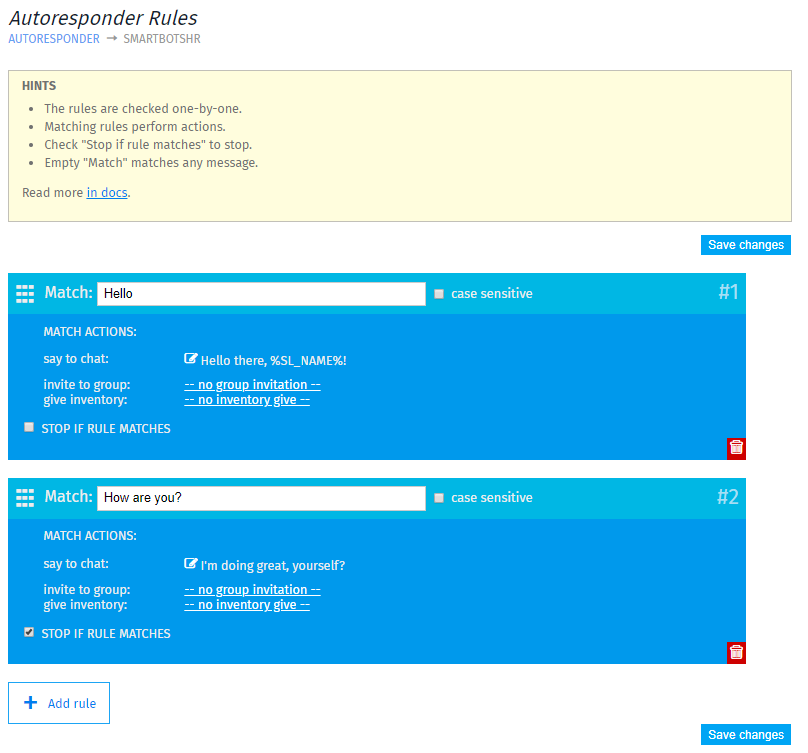
Your bot can perform several tasks while auto-responding:
- Respond with text to match messages
- Send group invitation and/or inventory offers
- Respond to several messages at once
Creating rules & examples
To create a new rule, visit LocalChat Autoresponder page and click Add rule.
Each rule comes with following options:
- Match - acts as a trigger message for every rule
- Case sensitive - defines if your Match message is case-sensitive or not
- Say to chat - A message that bot sends out
- Show variables - Shows variables: "%SL_NAME%" and "%FIRST_NAME%"
- Invite to group - Sends a group invite
- Give inventory - Sends an inventory offer
- Stop if rule matches - Read more below
Rules with text replies
Rules with text replies will trigger when bot hears a Match message in chat. When Match message is "Hi", bot will reply "Hello!" (view screenshot)

You can also create a next rule with "Stop if rule matches" enabled - in this case, when someone sends "Hi how are you" - bot will reply to both rules.
Rules with invitation/inventory offer
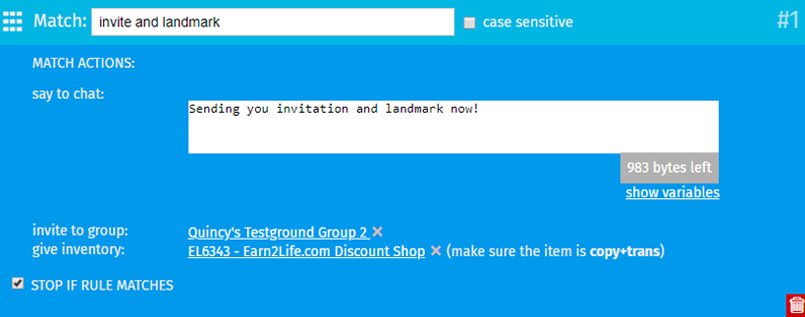
Bot can send invitations and/or inventory offers. For example, if bot hears "invite and landmark" in chat, it will send group invitation, landmark and a message!
Examples
1. Simple reply-to-all
This ruleset will reply to all local chat messages:
Rule 1: Match: -- empty -- Say to chat: Hello %FIRST_NAME%! Please open our website for more information. Stop if matches: YES
<<Image>>
2. Multiple variants with a default reply
This ruleset allows setting up various replies to various local chat messages (as much as you need):
Rule 1
Match: website
Say to chat: Our website is https://www.mysmartbots.com
Stop if matches: YES
Rule 2
Match: landmark
Say to chat: Here's the landmark to our location!
Give inventory: SmartBots Landmark
Stop if matches: YES
Rule 3
Match: -- empty --
Say to chat: To get more help, contact our support managers!
Stop if matches: YES
<<Image>>
3. Matching several rules
This ruleset shows how multiple rules can match one message (saying "hi" or "hello" and then "Welcome")
Rule 1
Match: hi
Say to chat: Hi there %FIRST_NAME%!
Stop if matches: NO
Rule 2
Match: hello
Say to chat: Hello %FIRST_NAME%!
Stop if matches: NO
Rule 3
Match: -- empty --
Say to chat: Welcome to our office! You can find more info on boards
Stop if matches: YES
Useful hints
- If you leave Match message blank, that will be your default rule
- There is no limit on how many rules you can create
- The rules on top take priority over the one on the bottom, eg if you have a rule that says "if: hi" the bot will say "hello" and another that says "if: hi how are you" the bot will say "i am fine thank you", the one on top will occur i.e the bot will say hello.
- If you are using give inventory feature, make sure the object has copy + transfer permissions
How to purchase
See the Purchasing Add-Ons page for step-by-step add-on activation instructions.