Support Bot Telegram Integration
|
QuincyJohnes (Talk | contribs)
(Created page with "Alive Support Bot add-on for Personal Bots now includes the option to be integrated with [https://telegram.org/ Telegram] - a popular mess...")
|
QuincyJohnes (Talk | contribs)
|
||
| Line 6: | Line 6: | ||
# Customer sends your Support Bot a message in SL |
# Customer sends your Support Bot a message in SL |
||
| - | # Bot forwards |
+ | # Bot forwards copy of the message in your Telegram group |
| - | # Your staff |
+ | # Your staff member ''replies anything'' to the bot & picks up the customer |
[[Image:illustration_process.png|link=|center|border|750px]] |
[[Image:illustration_process.png|link=|center|border|750px]] |
||
| + | |||
| + | == Setup & Demonstration == |
||
| + | |||
| + | '''BE ADVISED:''' These instructions assume that you purchased [https://www.mysmartbots.com/store/item/1/alive_support_bot/ Alive Support Bot] add-on and created '''Telegram group chat''' |
||
| + | |||
| + | === Add Support Managers === |
||
| + | |||
| + | Before starting the integration process, you must '''add your team members''' to the add-on and setup their '''Telegram usernames'''. |
||
| + | |||
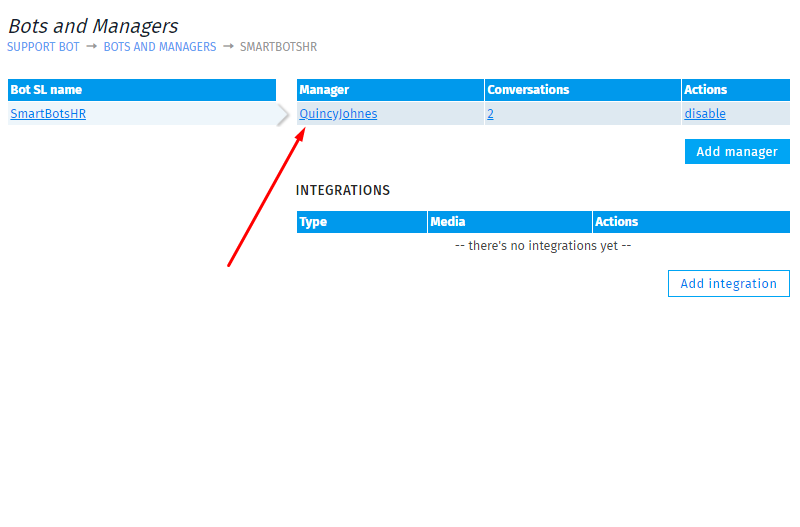
| + | 1. Visit Alive Support Bot add-on page and click '''Bots and Managers''' |
||
| + | [[Image:First_page_-_bots_and_managers.png|link=|center|border|600px]] |
||
| + | 2. Click on '''bot's name''' and select '''Add manager''' |
||
| + | [[Image:Add_manager.png|link=|center|border|600px]] |
||
| + | 3. Enter your '''Support Manager's SL name''' and click '''Proceed''' |
||
| + | [[Image:Final_add_manager.png|link=|center|border|600px]] |
||
| + | 4. Click on your '''Managers name''' and enter their '''Telegram username''' |
||
| + | [[Image:Click_on_manager.png|link=|center|border|600px]] |
||
Revision as of 07:01, 8 June 2019
Alive Support Bot add-on for Personal Bots now includes the option to be integrated with Telegram - a popular messenger application that can be downloaded to your Windows, Mac, iOS and Android devices.
How does it work
The integration process works as following:
- Customer sends your Support Bot a message in SL
- Bot forwards copy of the message in your Telegram group
- Your staff member replies anything to the bot & picks up the customer

Setup & Demonstration
BE ADVISED: These instructions assume that you purchased Alive Support Bot add-on and created Telegram group chat
Add Support Managers
Before starting the integration process, you must add your team members to the add-on and setup their Telegram usernames.
1. Visit Alive Support Bot add-on page and click Bots and Managers
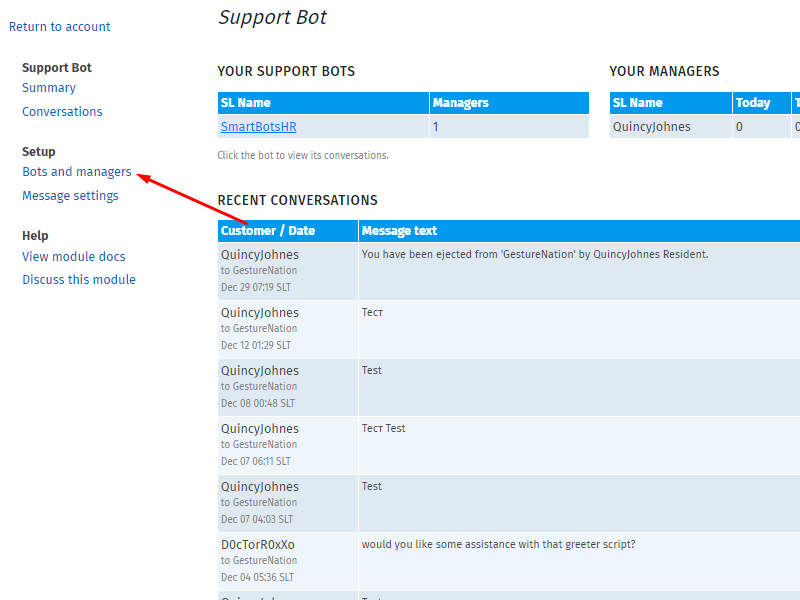
2. Click on bot's name and select Add manager
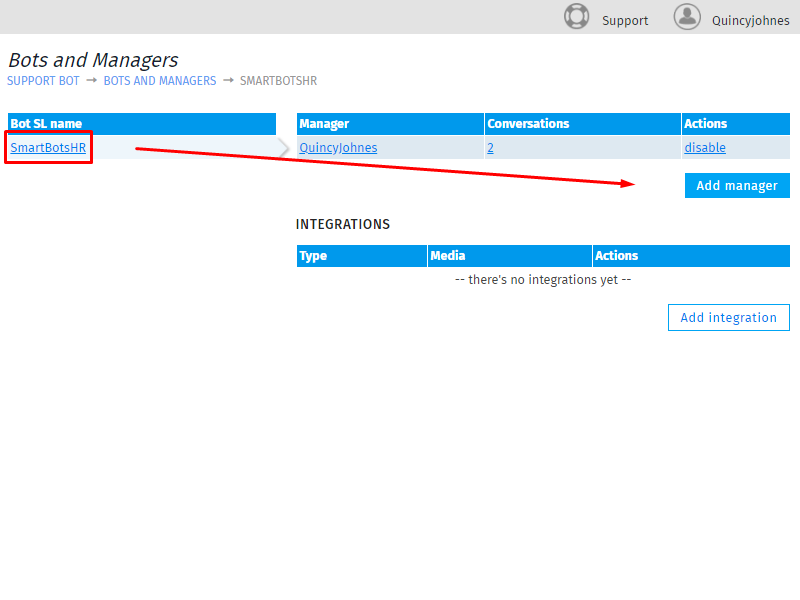
3. Enter your Support Manager's SL name and click Proceed
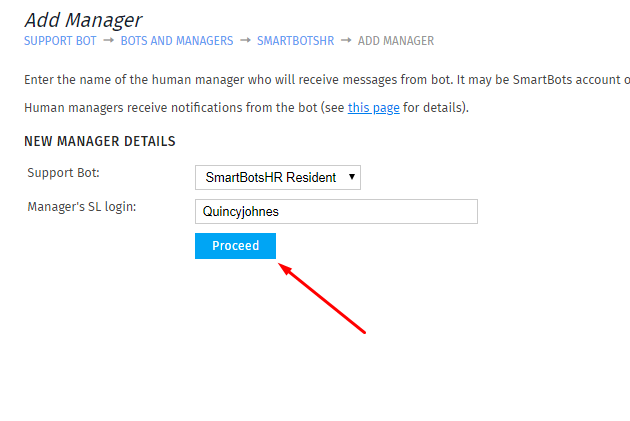
4. Click on your Managers name and enter their Telegram username