Bot access code
|
QuincyJohnes (Talk | contribs)
|
m (moved Bot access code & API tokens to Bot access code over redirect)
|
||
| (2 intermediate revisions not shown) | |||
| Line 1: | Line 1: | ||
__NOTOC__ |
__NOTOC__ |
||
| - | Bot |
+ | Bot access codes and API tokens are ways for you to authenticate your bot with scripts, plugins and devices. It works like the [[Security code]] for groups, but controls access to your personal bot. |
| - | + |
<div style="background-color: #ecf4ff;border: 1px solid #24a7f7;padding: 10px 20px 9px 20px;border-radius: 2px;color: #006595;font-weight: bold;">Since March 2026, the new and preferred way is to use API tokens.</div>
|
|
| - | == Setting the |
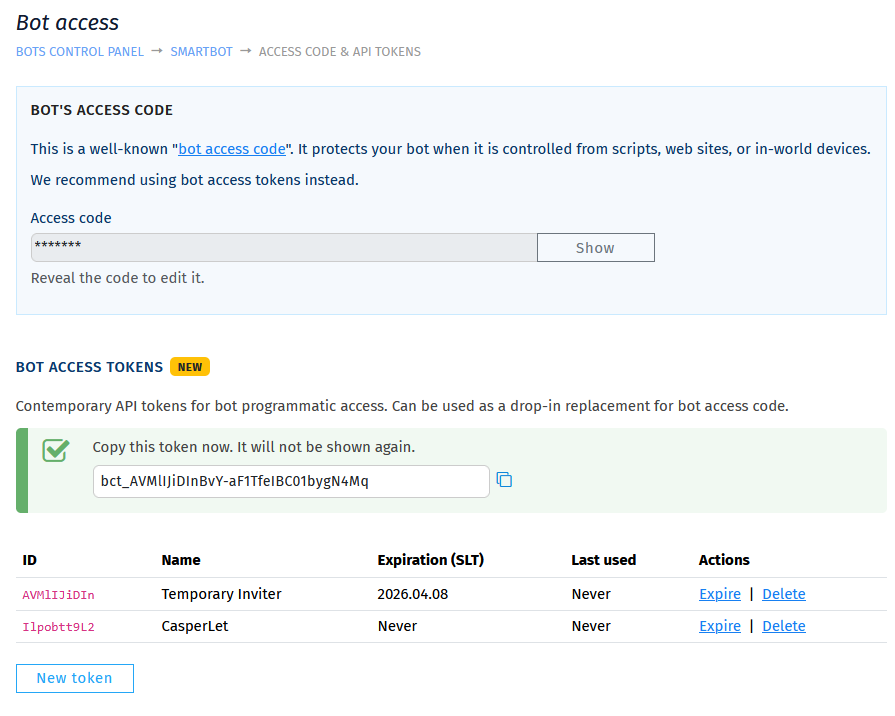
+ | == Setting the API Token == |
| - | # Login to your account at [ |
+ | # Login to your account at [https://mysmartbots.com https://mysmartbots.com]. |
| - | # In the menu on the left, click |
+ | # In the menu on the left, click 'Your personal bots' and then 'manage bot'.
|
| - | # |
+ | # Click '''Security > Access code & API tokens'''.
|
| - | [[ |
+ | # Click 'New Token' and enter a name and expiry for the token. |
| + | [[File:API Token Setup.png|border|link=|700px]] |
||
| - | |||
| - | + |
== Setting the Legacy Bot Access Code ==
|
|
| + |
# Login to your account at [https://mysmartbots.com https://mysmartbots.com].
|
||
| + |
# In the menu on the left, click 'Your personal bots' and then 'manage bot'.
|
||
| + |
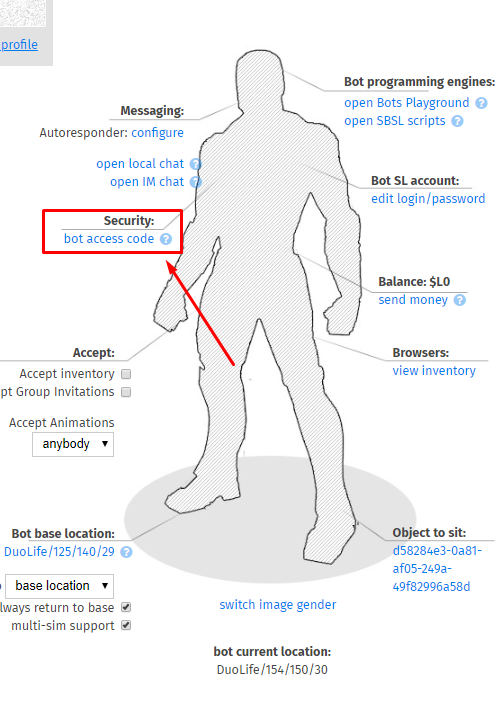
# Set or change the bot access code:
|
||
| + |
[[Image:Bot_access_code_new_2.png|border|link=]]
|
||
[[Category: Existing customers]] |
[[Category: Existing customers]] |
||
[[Category: Personal bot]] |
[[Category: Personal bot]] |
||
Latest revision as of 11:39, 12 March 2026
Bot access codes and API tokens are ways for you to authenticate your bot with scripts, plugins and devices. It works like the Security code for groups, but controls access to your personal bot.
Since March 2026, the new and preferred way is to use API tokens.
Setting the API Token
- Login to your account at https://mysmartbots.com.
- In the menu on the left, click 'Your personal bots' and then 'manage bot'.
- Click Security > Access code & API tokens.
- Click 'New Token' and enter a name and expiry for the token.
Setting the Legacy Bot Access Code
- Login to your account at https://mysmartbots.com.
- In the menu on the left, click 'Your personal bots' and then 'manage bot'.
- Set or change the bot access code: