
Outfit Rotator
|
QuincyJohnes (Talk | contribs)
|
|||
| Line 9: | Line 9: | ||
Bot rotates outfits, announcing them to the local chat. |
Bot rotates outfits, announcing them to the local chat. |
||
| - | + | [[Image:OutfitRotator2.png|border]] |
|
| + | |||
== Setting up == |
== Setting up == |
||
| Line 20: | Line 21: | ||
## Select it |
## Select it |
||
| - | + | [[Image:OutfitRotatorWeb.png|border]] |
|
You can now set local chat message for each outfit, along with a outfit display time. Bot starts wearing outfits automatically. |
You can now set local chat message for each outfit, along with a outfit display time. Bot starts wearing outfits automatically. |
||
| Line 30: | Line 31: | ||
# Login to your bot with any Viewer |
# Login to your bot with any Viewer |
||
# Dress up your bot |
# Dress up your bot |
||
| - | # Go to your bot's Outfits & click "Wearing"<br> |
+ | # Go to your bot's Outfits & click "Wearing"<br>[[Image:Outfitswearing.png|border|center]]
|
| - | + | # Scroll down and save the outfit to a separate folder<br>[[Image:Savingoutfit2.png|border|center]]
|
|
| - | # Scroll down and save the outfit to a separate folder<br> |
+ | |
| - | + | ||
# Repeat for every outfit you need |
# Repeat for every outfit you need |
||
__NOTOC__ |
__NOTOC__ |
||
Revision as of 17:53, 9 June 2017
This is a bot add-on:
1. Get this addon:
- Buy in web Bot Store
- Then attach to your bot
2. Configure in left menu:
Outfit Rotator
3. Get more help:
- read docs
- contact support
Outfit Rotator is an add-on for Personal Bots to automatically change model appearance wearing pre-configured outfit folders.
Bot rotates outfits, announcing them to the local chat.

Setting up
- First, prepare outfit folders set (if you need help, read "Creating outfits" below)
- Open Outfit Rotator addon page
- Add your outfits:
- Click "Add outfit folder"
- Locate folder in Inventory Browser
- Select it

You can now set local chat message for each outfit, along with a outfit display time. Bot starts wearing outfits automatically.
Creating outfits
Outfits can be created by logging into your bot using SL Viewer (native, Firestorm etc). Proceed with the following steps:
- Login to your bot with any Viewer
- Dress up your bot
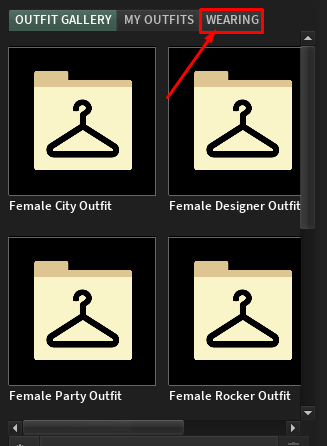
- Go to your bot's Outfits & click "Wearing"
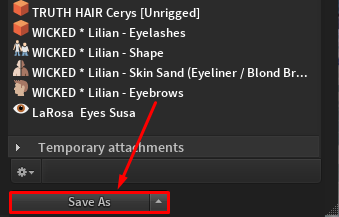
- Scroll down and save the outfit to a separate folder
- Repeat for every outfit you need

