
Bot access code
|
QuincyJohnes (Talk | contribs)
|
QuincyJohnes (Talk | contribs)
(→Setting the Bot Access Code)
|
||
| Line 8: | Line 8: | ||
# In the menu on the left, click "Your personal bots" and then "manage bot" |
# In the menu on the left, click "Your personal bots" and then "manage bot" |
||
# Set or change the bot access code: |
# Set or change the bot access code: |
||
| - | [[Image:Bot_access_code_new.png|border|link=]] |
+ | [[Image:Bot_access_code_new.png|center|border|link=]] |
== Usage of Bot Access Code == |
== Usage of Bot Access Code == |
||
Revision as of 21:05, 18 January 2019
Bot Access Code is a password used to protect your personal bot from being used by other people.
It works like the Security code for groups, but controls access to your personal bot.
Setting the Bot Access Code
- Login to your account at http://www.mysmartbots.com.
- In the menu on the left, click "Your personal bots" and then "manage bot"
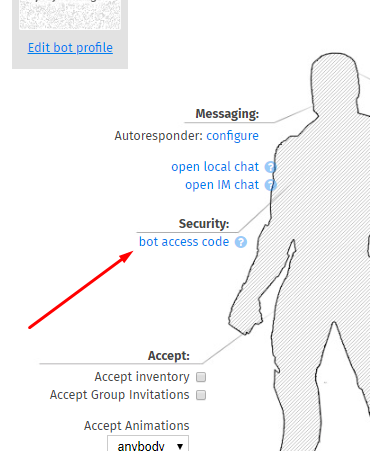
- Set or change the bot access code:
Usage of Bot Access Code
The Bot Access Code is required when you use SmartBots API functions and devices to control your personal bot.