
How to pay for Additional Services
Chevonn Edelmann (Talk | contribs)
(Created page with "Locate SmartBots terminal. The easiest way is to teleport to [http://www.mysmartbots.com/en/contacts.html SmartBots office]. You can also use SmartBots Terminals in [[Franchise|p...")
Newer edit →
(Created page with "Locate SmartBots terminal. The easiest way is to teleport to [http://www.mysmartbots.com/en/contacts.html SmartBots office]. You can also use SmartBots Terminals in [[Franchise|p...")
Newer edit →
Revision as of 17:25, 5 December 2012
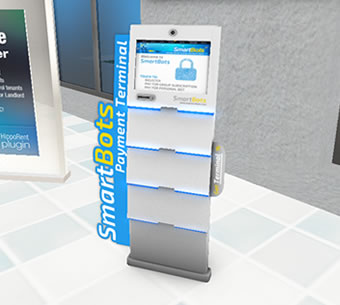
Locate SmartBots terminal. The easiest way is to teleport to SmartBots office. You can also use SmartBots Terminals in partner's locations.
NOTE: Before following these steps you should have already placed an order for the service you wish to pay for
Instructions
- Touch SmartBots Terminal:
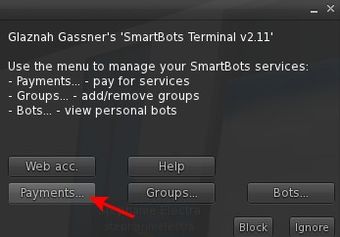
- Click on the "Payments..." button:
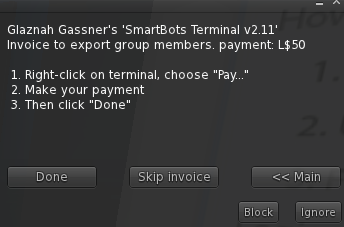
- A invoice appears whenever you have a pending payment which shows you what the invoice is for and the cost as well as some instructions
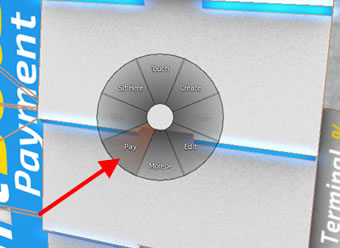
- Right click on the terminal and select pay
- Click the button showing the amount to pay to complete the payment
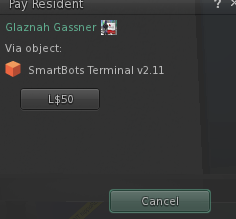
The service is now paid or and you should receive a confirmation message form your bot shortly (depending on which additional service you were paying for).