
Immortal Bot (add-on)
|
QuincyJohnes (Talk | contribs)
|
|||
| Line 2: | Line 2: | ||
store_id=11| |
store_id=11| |
||
menu_text=Immortal Bot| |
menu_text=Immortal Bot| |
||
| - | docs=Immortal Bot ( |
+ | docs=Immortal Bot (Add-On)| |
}} |
}} |
||
| - | "Immortal Bot" |
+ | "Immortal Bot" add-on makes your bot never-expiring. When enabled, this add-on shifts the expiration date to the future, thus your bot will never expire. |
| - | If you have several Bots, you can purchase several Immortal Bot |
+ | If you have several Bots, you can purchase several Immortal Bot add-ons and assign one to each respective bot. |
== How to purchase == |
== How to purchase == |
||
# Open SmartBots Bot Store:[[Image:Purchase immortal 1.jpg|link=|center|border]] |
# Open SmartBots Bot Store:[[Image:Purchase immortal 1.jpg|link=|center|border]] |
||
| - | # Purchase the |
+ | # Purchase the add-on in Bot Store (view instructions [[Purchasing Add-On|here]]). |
| - | # Assign the |
+ | # Assign the add-on to your bot (use [[Personal Bot Control Panel]]): [[Image:Purchase immortal 3.jpg|link=|center|border]] |
# Enjoy your never-expiring bot! |
# Enjoy your never-expiring bot! |
||
== Additional information == |
== Additional information == |
||
| - | # There are two different |
+ | # There are two different add-ons: one for Model bots, and one for Standard bots (latter may not be available for purchase) |
| - | # You can disable the |
+ | # You can disable the add-on for one bot and enable it on another. The "Immortal" status will be moved to the new bot. |
| - | # The bot has to be active before applying the |
+ | # The bot has to be active before applying the add-on. Thus, you need to make at lease one regular subscription payment to launch your bot. |
| - | # You can refund your |
+ | # You can refund your add-on purchase within 3 days. |
[[Category: Personal bots]] |
[[Category: Personal bots]] |
||
| - | [[Category:Bot |
+ | [[Category:Bot add-ons]] |
Revision as of 02:30, 22 June 2017
This is a bot add-on:
1. Get this addon:
- Buy in web Bot Store
- Then attach to your bot
2. Configure in left menu:

Immortal Bot
"Immortal Bot" add-on makes your bot never-expiring. When enabled, this add-on shifts the expiration date to the future, thus your bot will never expire.
If you have several Bots, you can purchase several Immortal Bot add-ons and assign one to each respective bot.
How to purchase
- Open SmartBots Bot Store:
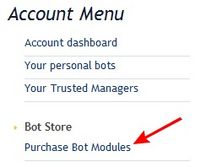
- Purchase the add-on in Bot Store (view instructions here).
- Assign the add-on to your bot (use Personal Bot Control Panel):
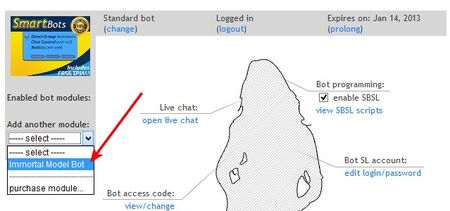
- Enjoy your never-expiring bot!
Additional information
- There are two different add-ons: one for Model bots, and one for Standard bots (latter may not be available for purchase)
- You can disable the add-on for one bot and enable it on another. The "Immortal" status will be moved to the new bot.
- The bot has to be active before applying the add-on. Thus, you need to make at lease one regular subscription payment to launch your bot.
- You can refund your add-on purchase within 3 days.