Trusted Managers
| Line 6: | Line 6: | ||
{| width=100% |
{| width=100% |
||
| - | ![[Group Inviter Service|Inviter service]] |
+ | ! width=33% | [[Group Inviter Service|Inviter service]] |
| - | ![[Group Chat Control Service|Chat service]] |
+ | ! width=33% | [[Group Chat Control Service|Chat service]] |
| - | ![[Group Notices Service|Notices service]] |
+ | ! width=33% | [[Group Notices Service|Notices service]] |
|- |
|- |
||
| Line 14: | Line 14: | ||
* Edit group inviter settings and view invitation statistics |
* Edit group inviter settings and view invitation statistics |
||
| class=row-a | |
| class=row-a | |
||
| - | * |
+ | * Access the group chat in browser |
* Eject group chat spammers |
* Eject group chat spammers |
||
* Send group chat IMs |
* Send group chat IMs |
||
Revision as of 07:25, 10 August 2011
You can create separate accounts to manage your group with SmartBots. These accounts can be used by your company staff to send notices, setup inviter etc.
Features
Group moderators can access the groups you select and perform various operations:
| Inviter service | Chat service | Notices service |
|---|---|---|
|
|
|
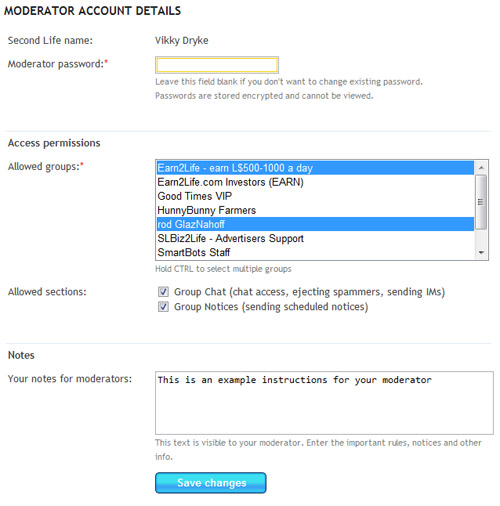
Creating Moderator Accounts
Login to your account and click "Group Moderators" link. Edit your existing moderators or create a new account: