
Personal Bot HUD
| Line 1: | Line 1: | ||
| - | [[Image:Smartbots-hud-v2-overview.jpg|right|link=]]SmartBots Personal Bot HUD allows to remotely control your Second Life bot. |
+ |
__NOTOC_[[Image:Smartbots-hud-v2-overview.jpg|right|link=]]SmartBots Personal Bot HUD allows to remotely control your Second Life bot. |
HUD consists of the header buttons, tabs and bot status buttons. |
HUD consists of the header buttons, tabs and bot status buttons. |
||
| Line 5: | Line 5: | ||
== Initializing HUD == |
== Initializing HUD == |
||
| - | Before using HUD, you have to set the personal bot you are going to control. |
+ | Before using HUD, you have to set the personal bot you are going to control. Click the "Select bot" button to choose the bot from the menu list. Your bot status will be shown over the HUD in few seconds. |
== HUD Header Buttons == |
== HUD Header Buttons == |
||
Revision as of 13:11, 22 October 2011
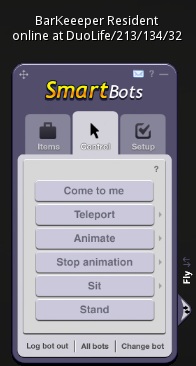
HUD consists of the header buttons, tabs and bot status buttons.
Contents |
Initializing HUD
Before using HUD, you have to set the personal bot you are going to control. Click the "Select bot" button to choose the bot from the menu list. Your bot status will be shown over the HUD in few seconds.
HUD Header Buttons
HUD header buttons allow to (from left to right):
- drag your HUD on the screen with your mouse
- call a brief help
- fold your HUD (to unfold it, click the HUD)
Tab: Items
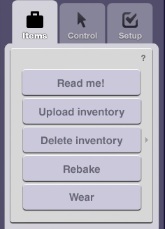
The "Items" tab contains commands to control the bot's inventory:
- Read Me! - gives a notecard instructions about outfits
- Upload inventory - get a notecard about uploading inventory
- Delete inventory - delete one of the uploaded inventory items/folders
- Rebake - rebakes bot textures if appearance is broken
- Wear - use uploaded folder to wear
Tab: Control
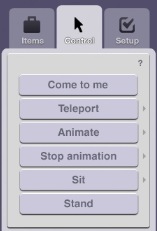
The "Control" tab contains commands to teleport, move and animate your bot:
- Come to me - moves bot to you if you're on same sim
- Teleport - teleports bot to you or you to the bot
- Animate - choose animation from inventory and play it
- Stop animation - stop one of animations
- Sit - sit on SmartBots PoseStand or selected in-world object
- Stand - stand up the bot
Tab: Setup
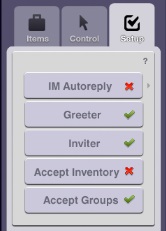
The "Setup" tab contains commands to setup a bot's behavior:
- IM Autoreply - toggle bot's IM autoresponder (allows using custom PandoraBot chatbot)
- Greeter - toggle greeter feature for this bot
- Inviter - toggle group inviter for this bot
- Accept inventory - toggle inventory acceptance (from other residents)
- Accept groups - toggle group invitation acceptance